File storage
Uploaded images and files go either to the server’s disk (the default) or to an S3-compatible bucket. Set it up with environment variables, or in the admin under Settings → Email & storage. The Media library works the same either way.
Local disk
Section titled “Local disk”By default files are stored in backend/uploads/ (the uploads folder in the backend’s working directory) and served by the backend at <APP_URL>/uploads/<file>. That’s fine for a single server with a persistent disk.
Local disk also doesn’t work with more than one backend instance: each instance would see only the files uploaded to it.
S3-compatible storage
Section titled “S3-compatible storage”With S3 storage, each upload is streamed to the bucket, the temporary copy on the server is deleted, and the media library stores the bucket’s public URL. Any service that speaks the S3 API works: AWS S3, Cloudflare R2, DigitalOcean Spaces, MinIO, Backblaze B2.
With environment variables
Section titled “With environment variables”STORAGE_DRIVER=s3STORAGE_S3_BUCKET=my-bucketSTORAGE_S3_REGION=us-east-1STORAGE_S3_ACCESS_KEY=AKIA...STORAGE_S3_SECRET_KEY=...# STORAGE_S3_ENDPOINT= # not for AWS; required for R2, Spaces, MinIO, B2# STORAGE_S3_PUBLIC_URL= # CDN or custom domain for file URLs| Variable | Required | Meaning |
|---|---|---|
STORAGE_DRIVER |
yes | s3, or local (the default). |
STORAGE_S3_BUCKET |
yes | Bucket name. |
STORAGE_S3_ACCESS_KEY |
yes | Access key ID. |
STORAGE_S3_SECRET_KEY |
yes | Secret access key. |
STORAGE_S3_REGION |
no | Region. Default us-east-1. Use auto for R2. |
STORAGE_S3_ENDPOINT |
no | The provider’s S3 endpoint. Leave it empty for AWS. |
STORAGE_S3_PUBLIC_URL |
no | Base URL for file links, such as https://assets.example.com. |
With STORAGE_DRIVER=s3 and a missing bucket, access key or secret key, the backend refuses to start and names what’s missing.
In the admin
Section titled “In the admin”Admins can set storage up without touching the server: in Settings → Email & storage, under File storage, choose S3-compatible storage in Keep uploads on. Pick a Provider (Amazon S3, Cloudflare R2, DigitalOcean Spaces, or Other (MinIO, Backblaze B2…)), which fills in the endpoint and region pattern, then enter the Bucket, Access key ID, Secret access key and, optionally, the Public URL. Test connection writes a small file to the bucket and deletes it again. The setup wizard offers the same form as its last step.
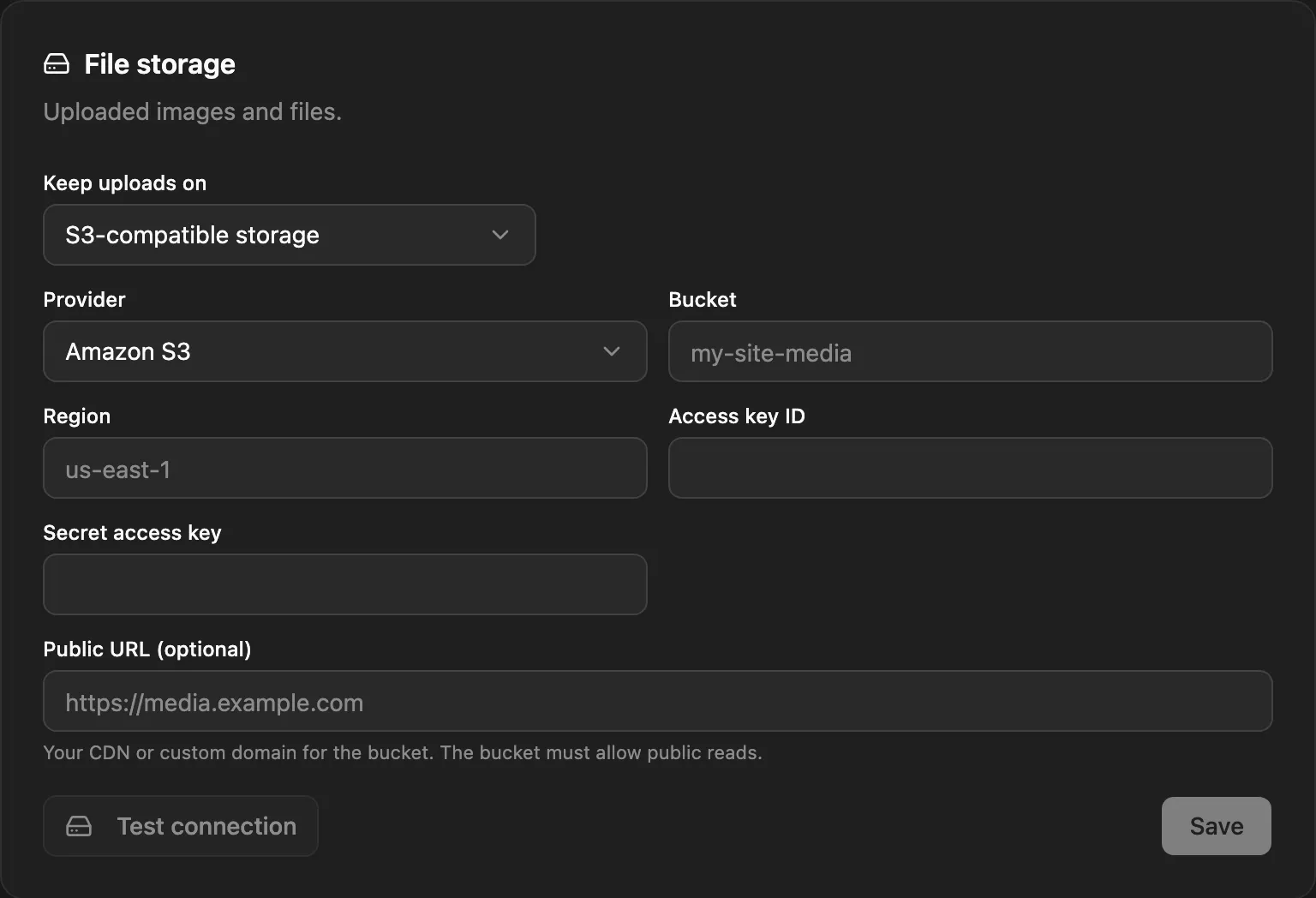
The secret key is stored encrypted, with a key derived from SETTINGS_SECRET (or JWT_SECRET when that isn’t set). If that secret later changes, the saved key can’t be read and the backend falls back to local disk, with an error in its log. Keep the secret with your backups.
Which settings win
Section titled “Which settings win”Storage is chosen once, when the backend starts:
STORAGE_DRIVERset in the environment: theSTORAGE_*variables are used, and the admin’s form is read-only.- Otherwise, the storage saved in Settings → Email & storage.
- Otherwise, local disk.
A change made in the admin takes effect after a restart: use Restart now, which needs a process manager or Docker to start the backend again. Files already uploaded aren’t moved, and their URLs keep pointing where they were stored.
File URLs
Section titled “File URLs”| Setup | File URL |
|---|---|
| Local disk | <APP_URL>/uploads/<file> |
S3 with STORAGE_S3_PUBLIC_URL |
<STORAGE_S3_PUBLIC_URL>/<file> |
| S3 with an endpoint | <STORAGE_S3_ENDPOINT>/<bucket>/<file> |
| AWS S3 | https://<bucket>.s3.<region>.amazonaws.com/<file> |
With an endpoint, NodePress uses path-style addressing. Many providers don’t serve public files from their API endpoint, so set STORAGE_S3_PUBLIC_URL to the bucket’s public or custom domain.
Public access
Section titled “Public access”Files must be publicly readable, because the media library and your site link to them directly. NodePress uploads every file with the public-read ACL.
Provider examples
Section titled “Provider examples”Cloudflare R2
STORAGE_DRIVER=s3STORAGE_S3_BUCKET=my-bucketSTORAGE_S3_REGION=autoSTORAGE_S3_ENDPOINT=https://<account-id>.r2.cloudflarestorage.comSTORAGE_S3_ACCESS_KEY=...STORAGE_S3_SECRET_KEY=...STORAGE_S3_PUBLIC_URL=https://assets.example.comDigitalOcean Spaces
STORAGE_DRIVER=s3STORAGE_S3_BUCKET=my-spaceSTORAGE_S3_REGION=nyc3STORAGE_S3_ENDPOINT=https://nyc3.digitaloceanspaces.comSTORAGE_S3_ACCESS_KEY=...STORAGE_S3_SECRET_KEY=...STORAGE_S3_PUBLIC_URL=https://my-space.nyc3.cdn.digitaloceanspaces.comMinIO
STORAGE_DRIVER=s3STORAGE_S3_BUCKET=nodepressSTORAGE_S3_ENDPOINT=https://minio.example.comSTORAGE_S3_ACCESS_KEY=...STORAGE_S3_SECRET_KEY=...Backblaze B2
STORAGE_DRIVER=s3STORAGE_S3_BUCKET=my-bucketSTORAGE_S3_REGION=us-west-004STORAGE_S3_ENDPOINT=https://s3.us-west-004.backblazeb2.comSTORAGE_S3_ACCESS_KEY=<keyID>STORAGE_S3_SECRET_KEY=<applicationKey>The uploads folder with S3
Section titled “The uploads folder with S3”Even with S3, the backend writes to backend/uploads/: each upload is staged there before it goes to the bucket, resized image variants are cached in uploads/.cache, and WordPress imports keep the uploaded export there until the job runs. It needs to be writable, but it doesn’t need to survive a redeploy. With several instances, share it if you use the WordPress importer, since the import job can run on another instance.
Backups
Section titled “Backups”The backup script includes local uploads but not S3 buckets. Back a bucket up with your provider’s tools, such as versioning or replication.