Content types
A content type is the template for one kind of content. It has a name, a list of fields and a few settings. Create them under Content Types → New Content Type (admins only).
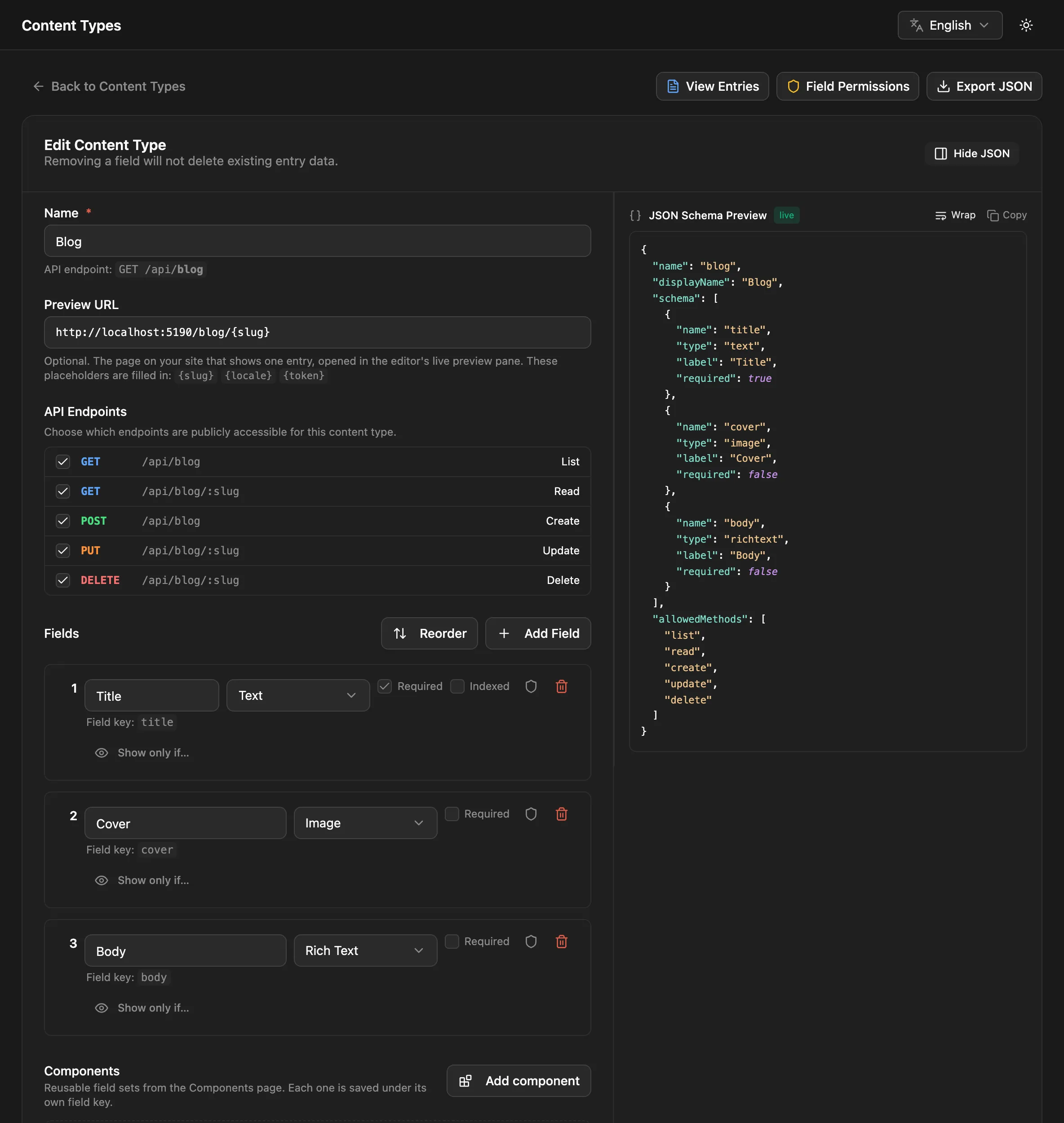
Names and URLs
Section titled “Names and URLs”You can type any name. NodePress stores it in snake_case and uses hyphens in URLs:
| You type | Stored as | API URL |
|---|---|---|
Blog |
blog |
/api/blog |
Team Members |
team_members |
/api/team-members |
FAQ-items |
faq_items |
/api/faq-items |
The underscore form (/api/team_members) works too, and API key scopes and permissions accept either. The editor shows the endpoint as you type. A content type can also have a display name, the label the admin shows; the stored name doesn’t change.
Names that would clash with NodePress’s own routes are refused: ai, api-keys, audit-log, auth, brand, choice-lists, components, content-types, entries, forms, graphql, health, import, jobs, locales, media, metrics, permissions, plugins, redirects, releases, roles, search, server-settings, submit, templates, uploads, users and webhooks.
API endpoints
Section titled “API endpoints”Under API Endpoints, choose which public operations the content type offers:
| Operation | Endpoint | Who can call it |
|---|---|---|
list |
GET /api/blog |
anyone (published entries) |
read |
GET /api/blog/:slug |
anyone (published entries) |
create |
POST /api/blog |
API key with write access, or a signed-in user |
update |
PUT /api/blog/:slug |
API key with write access, or a signed-in user |
delete |
DELETE /api/blog/:slug |
API key with write access, or a signed-in user |
All five are on by default. Turn them all off to make the content type private: it disappears from /api/:type, GraphQL, the OpenAPI docs and the sitemap for every caller, while editors keep working on it in the admin. Use this for internal content such as settings or notes.
Preview URL
Section titled “Preview URL”The Preview URL is the page on your site that shows one entry. It powers the entry editor’s live preview pane, and it’s used when a slug change creates a redirect. It’s an http(s) address with up to three placeholders:
{slug}: the entry’s slug{locale}: its language{token}: a signed preview token, valid for one hour, so your site can show drafts
https://www.example.com/blog/{slug}?preview={token}https://www.example.com/{locale}/docs/{slug}Placeholders aren’t allowed in the host name.
Changing a content type
Section titled “Changing a content type”You can rename a content type, and add, remove, reorder or retype fields at any time. Every change saves a schema version.
Entries store their values as JSON, so a schema change doesn’t move data by itself. When a change affects fields that already hold data, the editor shows what will happen and offers to rename, convert or delete the stored values with it. See Schema changes.
Other actions
Section titled “Other actions”| Action | What it does |
|---|---|
| Duplicate | Copies the schema to a new content type. |
| Export JSON | Downloads the schema, the components and choice lists it uses, and its preview URL. |
| Import JSON | On the New Content Type page: creates or updates content types from an export, after a dry run. Components and choice lists are imported first. |
| Start from a template | Creates a ready-made blog, agency or docs setup, optionally with sample entries. |
| Delete | Deletes the content type and all its entries. |
To keep schemas in git and copy them between sites, use the CLI: npx create-nodepress-app schema:pull saves them to nodepress.schema.json, and schema:push applies the file to another site.
Defining one through the API
Section titled “Defining one through the API”Admins can create content types with POST /api/content-types:
{ "name": "blog", "displayName": "Blog Posts", "schema": [ { "name": "title", "type": "text", "required": true }, { "name": "cover", "type": "image" }, { "name": "body", "type": "richtext" } ], "allowedMethods": ["list", "read"], "previewUrl": "https://www.example.com/blog/{slug}?preview={token}"}allowedMethods left out, or null, enables all five operations. [] makes the content type private.