Forms
Forms collect input from your site’s visitors: contact forms, sign-ups, applications. You define a form’s fields in the admin, your site posts submissions to a public endpoint, and NodePress validates them, stores them and runs the form’s actions (email, webhook).
Forms are separate from content types. A submission isn’t an entry; it lives under the form’s Submissions.
Forms and their submissions are managed by admins and editors. Other roles don’t see Forms in the admin, and the forms API refuses them. Anyone can submit to a form.
Building a form
Section titled “Building a form”Open Forms and click New Form.
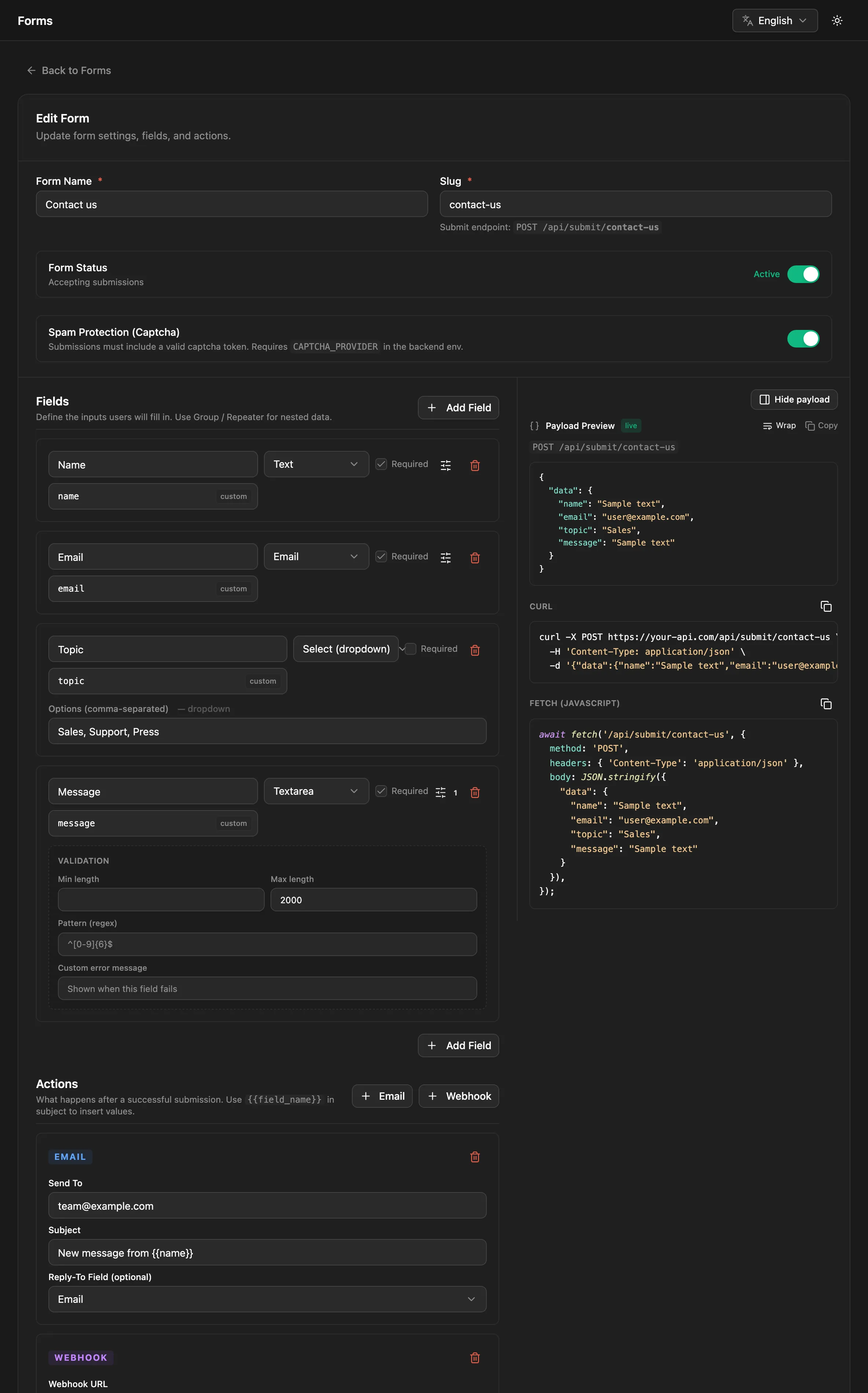
- Give the form a Form Name. The slug is generated from it; it’s the form’s address in the submit endpoint (
/api/submit/contact-us). - Under Fields, click Add Field for each input. Each field has a label, a key (generated from the label, or set yourself), a type, and validation rules.
- Under actions, add what should happen after each submission (see Actions).
- Click Create Form.
Form Status turns submissions on and off. An inactive form refuses new submissions.
Show payload previews the JSON your site should send for the fields you’ve defined.
Field types
Section titled “Field types”| Type | Label | Submitted value |
|---|---|---|
text |
Text | a string |
textarea |
Textarea | a string |
number |
Number | a number (numeric strings are converted) |
email |
a valid email address | |
url |
URL | a valid URL |
phone |
Phone | 6–20 digits, spaces, + ( ) . -, or your own pattern |
date |
Date | a date, stored as YYYY-MM-DD |
datetime |
Date & Time | a date and time, stored as ISO 8601 |
boolean |
Boolean (yes/no) | true or false |
select |
Select (dropdown) | one of the options |
radio |
Radio (single pick) | one of the options |
multiselect |
Multi-select | a list of options |
tags |
Tags (freeform) | a list of strings |
group |
Group (object) | an object with the group’s sub-fields |
repeater |
Repeater (list) | a list of objects with the repeater’s sub-fields |
Options for select, radio and multiselect are entered comma-separated.
Validation rules
Section titled “Validation rules”Each field can be required and, depending on its type, have:
| Rule | Applies to |
|---|---|
| Min / Max | numbers and dates |
| Whole number only | numbers |
| Min length / Max length | text fields |
| Pattern (regex) | text fields |
| Min items / Max items | multi-select, tags, repeater |
| Custom error message | all, replaces the default message |
Through the API, rules go in a field’s validation object: { "required": true, "maxLength": 500, "message": "Keep it short" }.
Submitting from your site
Section titled “Submitting from your site”POST /api/submit/:slug is public. Send the values under data, keyed by the fields’ keys:
curl -X POST https://cms.example.com/api/submit/contact-us \ -H "Content-Type: application/json" \ -d '{ "data": { "full_name": "Jane Doe", "email": "jane@example.com", "message": "Hello!" } }'{ "success": true, "submissionId": 42, "message": "Your submission has been received." }Values are checked and converted against the form’s fields. Keys that aren’t fields of the form are dropped, and empty optional fields are stored as null.
| Status | When |
|---|---|
201 |
Stored. The body is as above. |
400 |
Validation failed, the form is inactive, or the captcha didn’t pass |
404 |
No form with this slug |
413 |
The submission is larger than the limit |
429 |
Too many submissions from this IP |
A validation failure lists every problem:
{ "message": "Validation failed", "errors": [ { "path": "email", "rule": "email", "message": "\"Email\" must be a valid email address" }, { "path": "message", "rule": "required", "message": "\"Message\" is required" } ]}Nested fields have paths like address.city or guests[1].name.
Limits
Section titled “Limits”| Limit | Default | Environment variable |
|---|---|---|
| Submission size | 100 KB | FORM_MAX_PAYLOAD_BYTES |
| Nesting depth | 3 | FORM_MAX_DEPTH |
| Items in one list | 100 | FORM_MAX_ARRAY_ITEMS |
| Fields in total | 200 | FORM_MAX_FIELDS |
| Submissions per IP | 20 per minute |
Spam protection
Section titled “Spam protection”Every form has two protections built in:
- Rate limiting: 20 submissions per minute from one IP address.
- Honeypot: add a hidden field named
_honeyto your HTML form and send it with the data. People leave it empty; bots that fill in every field don’t. A submission with a non-empty_honeygets a success response (withsubmissionId: null) but is not stored, and no actions run.
<input type="text" name="_honey" tabindex="-1" autocomplete="off" style="position:absolute;left:-9999px" aria-hidden="true">Captcha
Section titled “Captcha”For stronger protection, turn on Spam Protection (Captcha) in the form builder. Each submission must then include a captcha token, which NodePress verifies with the provider:
-
Set the provider and its secret key on the server:
backend/.env CAPTCHA_PROVIDER=turnstile # or hcaptcha, recaptchaCAPTCHA_SECRET_KEY=0x4AAAAAAA...The backend refuses to start when
CAPTCHA_PROVIDERis set withoutCAPTCHA_SECRET_KEY. -
Add the provider’s widget to your form with its site key, and send the token it produces as
captchaToken:{ "data": { "email": "jane@example.com" }, "captchaToken": "XXXX.DUMMY.TOKEN" }
Supported providers are Cloudflare Turnstile (turnstile), hCaptcha (hcaptcha) and Google reCAPTCHA v2 or v3 (recaptcha; a v3 score below 0.5 fails).
Without CAPTCHA_PROVIDER on the server, the captcha switch has no effect and submissions aren’t checked. If the provider can’t be reached, the submission is accepted.
Actions
Section titled “Actions”Actions run after a submission is stored. They run in the background, so a slow mail server or endpoint never delays the visitor’s response. A failing action is retried, after 1 minute and then 10 minutes, and admins can see and retry it under Developer → Jobs.
Sends the submission to an address.
| Setting | Meaning |
|---|---|
| Send To | The recipient |
| Subject | The subject line. {{field_key}} inserts a submitted value: New message from {{full_name}} |
| Reply-To Field (optional) | A field whose value becomes the email’s Reply-To, so you can answer the sender directly |
The email lists each field’s label and value, with your brand’s name, logo and color. Email needs SMTP to be set up; without it, email actions are skipped. See Email.
Webhook
Section titled “Webhook”Sends the submission to a URL as JSON, with a 10-second timeout:
{ "data": { "full_name": "Jane Doe", "email": "jane@example.com", "message": "Hello!" } }| Setting | Meaning |
|---|---|
| Webhook URL | Where to send it |
| Method | POST (default) or PUT |
A response other than 2xx counts as a failure and is retried. Through the API, a webhook action can also have headers, for example an authorization header for the receiving service.
Like the site-wide webhooks, a form webhook only calls public addresses unless WEBHOOK_ALLOW_PRIVATE=true.
Form webhooks are separate from the site-wide webhooks, which report entry and media changes.
Submissions
Section titled “Submissions”Forms lists each form with its submission count. View submissions opens the form’s submissions, newest first, with search and Export CSV. Each submission stores the data, the submitter’s IP address and the time.
Deleting a form deletes all its submissions.
The form management endpoints need a login token. Your site only needs POST /api/submit/:slug.
| Method | Path | What |
|---|---|---|
POST |
/api/submit/:slug |
Public: submit { "data": { … }, "captchaToken": "…" } |
GET |
/api/forms |
List forms with submission counts. ?page=, ?limit= (default 50) |
POST |
/api/forms |
Create: name, slug, fields, optional actions, isActive, captchaEnabled |
GET |
/api/forms/:id |
One form |
PUT |
/api/forms/:id |
Update |
DELETE |
/api/forms/:id |
Delete the form and its submissions |
GET |
/api/forms/:id/submissions |
Submissions, newest first. ?page=, ?limit= (default 50, max 200) |
GET |
/api/forms/submissions/recent |
The 6 newest submissions across all forms |
A form definition:
{ "name": "Contact Us", "slug": "contact-us", "isActive": true, "captchaEnabled": false, "fields": [ { "name": "full_name", "type": "text", "label": "Full Name", "validation": { "required": true } }, { "name": "email", "type": "email", "label": "Email", "validation": { "required": true } }, { "name": "topic", "type": "select", "label": "Topic", "options": ["Sales", "Support"] }, { "name": "message", "type": "textarea", "label": "Message", "validation": { "required": true, "maxLength": 2000 } } ], "actions": [ { "type": "email", "to": "team@example.com", "subject": "New message from {{full_name}}", "replyToField": "email" }, { "type": "webhook", "url": "https://hooks.example.com/contact", "method": "POST" } ]}Group and repeater fields list their sub-fields in fields.