Live preview
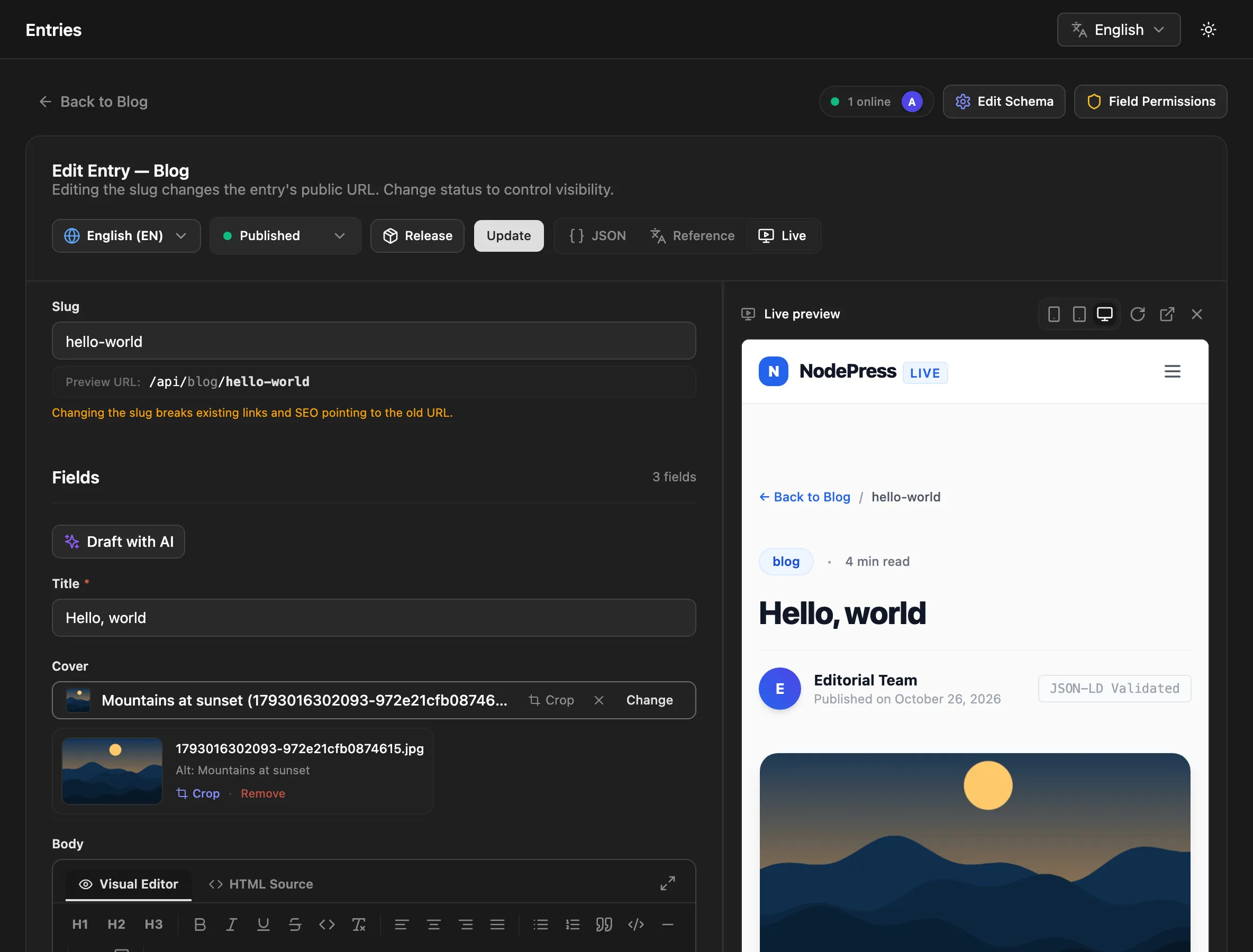
Live preview shows the entry you’re editing on your real site, in a pane next to the editor. Your site gets the form’s current values as you type, so editors see the page change before they save, and clicking an element on the page jumps to its field.
It takes two things: a Preview URL on the content type, and a few lines on your site.
1. Set the Preview URL
Section titled “1. Set the Preview URL”Edit the content type and set its Preview URL: the page of your site that shows one entry. It can contain {slug}, {locale} and {token}, which the editor fills in. See Preview URL.
https://www.example.com/api/draft?token={token}&slug={slug}&locale={locale}Once it’s set, the entry editor has a Live button in its toolbar. On a new entry, Save draft & preview saves a draft and opens the pane, because the preview needs a saved entry.
2. Show drafts on your site
Section titled “2. Show drafts on your site”A draft isn’t visible in the public API, so your preview page needs a way to read it. {token} is a preview token: signed, valid for one hour, and good for one entry only. Your site exchanges it for the entry:
GET /api/blog/my-draft-post/preview?token=<token>&locale=en- The response is the entry in the usual public shape, whatever its status, plus
"_preview": trueand itsstatus. - The slug and
localein the URL must match the entry the token was made for.localedefaults toen, so pass it for entries in other languages. - An invalid or expired token gets
401. A trashed entry gets404.
The editor asks for a new token before the current one expires. Editors (and contributors) can also create one with POST /api/entries/:id/preview-url, which returns { "token": "…", "expiresAt": "…" }.
A typical setup is a route on your site that checks the token, switches the framework’s draft or preview mode on, and keeps the token in a cookie so the page can read the draft. The Next.js starter in the NodePress repository (starters/nextjs) does exactly this in app/api/draft/route.ts, with app/api/disable-draft/route.ts to leave draft mode.
3. Update the page as the editor types
Section titled “3. Update the page as the editor types”The editor sends the form’s current values to the page in the pane with postMessage, a moment after each change. Install the client and listen for them:
npm install @nodepress-cms/clientimport { onPreviewUpdate, enableClickToEdit } from '@nodepress-cms/client/preview';
const adminOrigin = 'https://cms.example.com'; // where your NodePress admin runs
// Tells the editor the page is ready, then calls back on every edit.const stop = onPreviewUpdate((update) => { // update = { type: 'nodepress:preview', contentType, slug, locale, data } render(update.data);}, { adminOrigin });
// Elements with data-np-field get an outline on hover; a click focuses that field in the editor.const stopClicks = enableClickToEdit({ adminOrigin });<h1 data-np-field="title">Hello world</h1><div data-np-field="body">…</div>update.dataholds the unsaved values, andupdate.slugthe slug as currently typed.adminOriginis required. It can be a list of origins."*"is refused. Messages from any other origin are ignored.- Both helpers do nothing when the page isn’t inside a frame, so they’re safe to leave in production code. Both return a function that removes their listeners.
enableClickToEdittakesattribute(defaultdata-np-field) andoutline(default2px dashed #6366f1). For a field inside a container, a path such asblocks.0.headingfocuses the closest field the editor can find.isInPreviewFrame()tells you whether the page is in the pane.
Without these helpers the pane still shows your page as your site renders it. Click Reload after saving to see the changes.
If you render rich text from update.data in the browser, sanitize it first: it’s the editor’s unsaved input.
Requirements for your site
Section titled “Requirements for your site”- The page must be on the origin of the Preview URL. The editor only posts messages to that origin, and only accepts messages from it and from the frame.
- Your site must allow being framed by the admin: don’t send
X-Frame-Options: DENY, and if you send aContent-Security-Policywithframe-ancestors, include the admin’s origin. - When the admin and the site are on different sites, cookies set inside the frame (like a draft-mode cookie) need
SameSite=None; Secure, so the site must use HTTPS.
The pane
Section titled “The pane”The pane has Mobile, Tablet and Desktop widths, Reload, and Open in new tab. If the Preview URL isn’t a valid http(s) address, the pane says so instead of loading it.