Schema changes
Entries keep their values as JSON, keyed by field name. So changing a schema doesn’t move existing data by itself:
- Rename
headlinetotitle, and existing entries still have their value underheadline. - Retype
pricefrom text to number, and existing entries still hold strings. - Remove a field, and its values stay in the database.
NodePress handles this for you. When you save a content type whose changed fields already hold data, the admin shows a confirm dialog: what changes, how many entries each change affects, and how many values a conversion would lose. You choose whether to rename, convert or delete the stored values along with the schema.
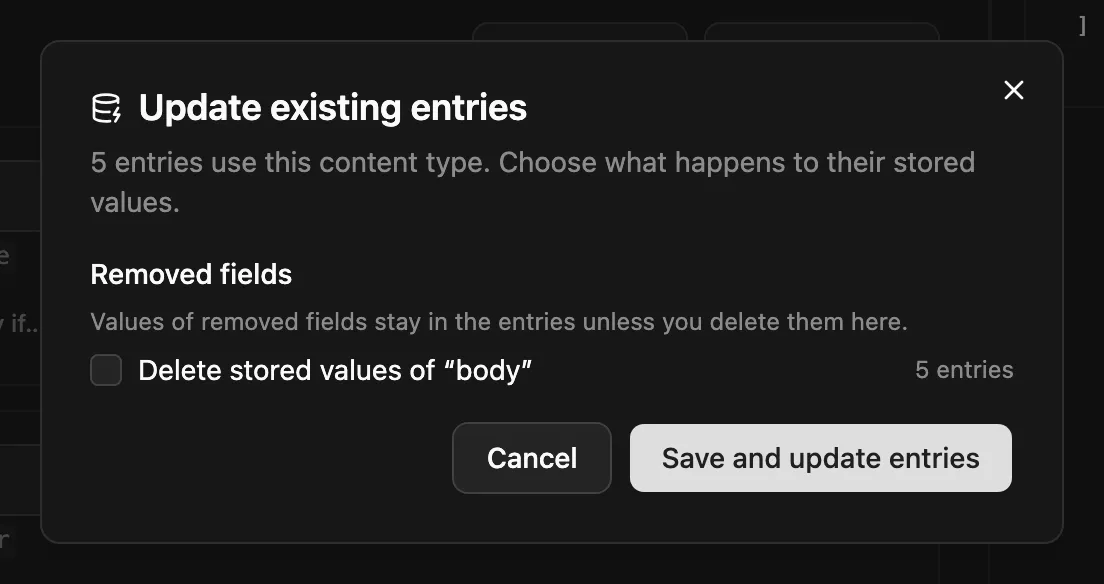
The schema change and the data change are applied in one transaction: both happen, or neither does.
Through the API
Section titled “Through the API”Preview the impact first. It takes the same body as the update and changes nothing:
POST /api/content-types/:id/schema-impact{ "entryCount": 120, "steps": [ { "kind": "rename", "field": "title", "from": "headline", "entries": 118, "lost": 0 }, { "kind": "convert", "field": "price", "fromType": "text", "toType": "number", "entries": 120, "lost": 3 } ], "removedNested": [], "warnings": []}Then apply the schema and the migrations together:
{ "schema": [ … ], "fieldMigrations": { "renames": [ { "from": "headline", "to": "title" }, { "from": "seo.desc", "to": "seo.meta_description" } ], "convert": ["price"], "drop": ["legacy_notes"] }}| Step | What it does |
|---|---|
renames |
moves values from the old key to the new one |
convert |
converts values of retyped fields to the new type (by their new path) |
drop |
deletes the values of removed fields |
Steps run in this order: top-level renames, nested renames, conversions, then drops.
Field paths
Section titled “Field paths”Nested fields are named by their path, using the containers’ new names:
| Path | Means |
|---|---|
title |
a top-level field |
seo.meta_title |
a field of the seo group, or of every row of a seo repeater |
blocks.hero.heading |
the heading field of every hero block in the blocks flexible field |
blocks.hero.buttons.link.url |
deeper: the url of the link group, in every row of buttons, in every hero block |
Each group or repeater adds one segment to the path; each flexible field adds two (the field, then the layout). A rename must stay inside the same group, repeater or layout.
Conversions
Section titled “Conversions”| From | To | How |
|---|---|---|
| anything | json |
kept as-is |
| text, textarea, select | richtext |
HTML-escaped and wrapped in <p> |
richtext |
text, textarea | HTML tags removed |
| text, number, boolean | text or select |
converted to a string |
| text | number |
numeric strings only |
| text, number | boolean |
true/yes/1/on and false/no/0/off |
| multi-select | text or select |
keeps the first value |
| text, number | multi-select | becomes a one-item list |
Values that can’t be converted are removed. The preview counts them as lost, so you see the cost before you save.
Good to know
Section titled “Good to know”- The editor tracks renames of sub-fields too and sends them for you. The preview’s
removedNestedlists fields removed from inside a group, repeater or layout that still exists, and the dialog offers to drop their data. - Renaming a flexible field’s layout is not migrated: blocks saved with the old layout name keep it.
- Reverse relation fields in other content types follow a renamed relation field.
- Old entry versions keep the shape they were saved with.
- Every schema save is kept as a schema version.