Repeaters, groups and flexible fields
Three field types hold other fields:
| Type | Holds | Stored as |
|---|---|---|
group |
one fixed set of sub-fields | an object |
repeater |
any number of rows, all with the same sub-fields | an array of objects |
flexible |
any number of blocks, each using one of several layouts | an array of objects with _layout |
They can contain each other: a flexible block can hold a repeater of groups, a repeater row can hold another repeater, and so on, up to three levels deep. Every field type works at every level.
A group keeps related fields together under one key. It’s a good fit for an address, social links or SEO metadata.
{ "name": "address", "type": "group", "options": { "subFields": [ { "name": "street", "type": "text" }, { "name": "city", "type": "text", "required": true }, { "name": "country", "type": "select", "options": { "choices": ["IN", "US", "DE"] } } ] }}"address": { "street": "12 Park Road", "city": "Bengaluru", "country": "IN" }Repeater
Section titled “Repeater”A repeater is a list. Editors add, remove and drag rows; every row has the same sub-fields.
{ "name": "faq", "type": "repeater", "options": { "subFields": [ { "name": "question", "type": "text", "required": true }, { "name": "answer", "type": "richtext" } ], "minItems": 1, "maxItems": 20 }}"faq": [ { "_id": "k3j9x2", "question": "Is it free?", "answer": "<p>Yes, MIT licensed.</p>" }, { "_id": "p8w1qa", "question": "Can I self-host?", "answer": "<p>That's the idea.</p>" }]minItems and maxItems are optional. Each row gets a stable _id, which works well as a React key.
Flexible
Section titled “Flexible”A flexible field is a page builder: a list of blocks where each block picks a layout, and each layout has its own fields. Editors add blocks, choose their layout and reorder them. It works like ACF’s flexible content.
{ "name": "sections", "type": "flexible", "options": { "layouts": [ { "name": "hero", "label": "Hero banner", "fields": [ { "name": "heading", "type": "text" }, { "name": "image", "type": "image" } ] }, { "name": "text_block", "label": "Text", "fields": [{ "name": "body", "type": "richtext" }] } ] }}"sections": [ { "_id": "a1b2c3", "_layout": "hero", "heading": "Welcome", "image": { "url": "…", "alt": "" } }, { "_id": "d4e5f6", "_layout": "text_block", "body": "<p>Some content.</p>" }]_layout says which layout a block uses. Your frontend switches on it:
{page.data.sections.map((block) => { switch (block._layout) { case 'hero': return <Hero key={block._id} {...block} />; case 'text_block': return <Text key={block._id} {...block} />; }})}Flexible fields also take minItems and maxItems.
When a block’s layout is changed in the entry editor, the values of the old layout’s fields are dropped on save — a block only ever holds its own layout’s fields (plus _id, _layout and _key).
Section keys
Section titled “Section keys”Public REST reads also return each top-level flexible field by name, as <field>_by_key, so site code can reach one section without counting positions:
"sections": [ { "_id": "a1b2c3", "_layout": "hero", "heading": "Welcome" }, { "_id": "d4e5f6", "_layout": "quote", "_key": "intro_quote", "text": "…" }, { "_id": "g7h8i9", "_layout": "quote", "_key": "closing_quote", "text": "…" }],"sections_by_key": { "hero": { "_id": "a1b2c3", "_layout": "hero", "heading": "Welcome" }, "intro_quote": { "…": "…" }, "closing_quote": { "…": "…" }}page.data.sections_by_key.hero.heading;page.data.sections_by_key.closing_quote.text;- A layout used once in the field is listed under its layout name — no key needed.
- A layout used more than once needs a section key on each of its sections. The entry editor marks the Section key box as required and won’t save without it; the API refuses the entry with
422. - Keys use lowercase letters, digits and underscores, start with a letter, and are unique within the field. They’re stored as
_keyand stay with their section when sections are reordered. - A key wins over a layout name of the same spelling.
sectionsitself keeps the editor’s order, for rendering the page. <field>_by_keyis only added by REST reads, and never when the content type has a real field of that name. GraphQL exposes_keyon each section; OpenAPI and generated types describe both.
Nesting
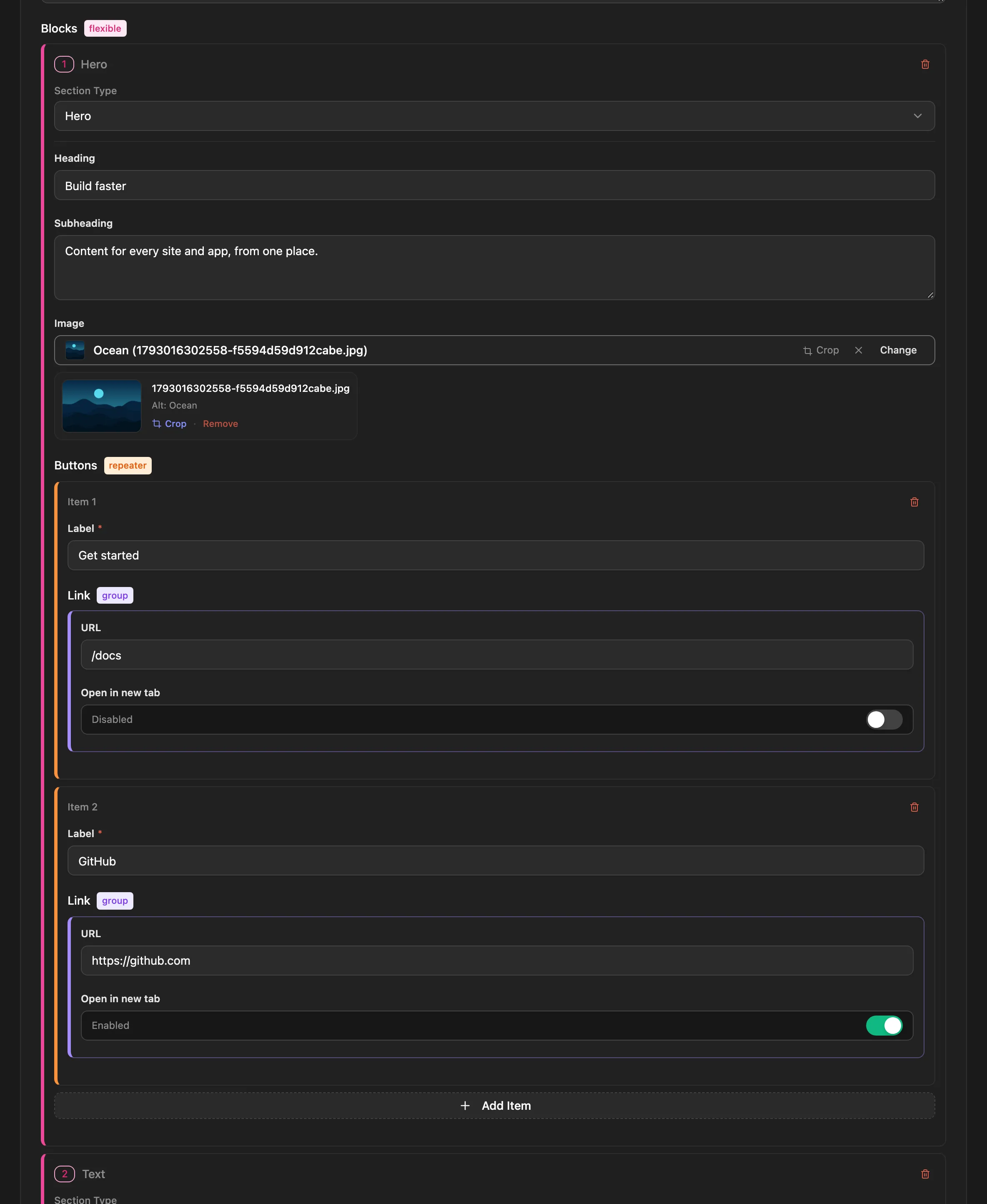
Section titled “Nesting”Containers can hold containers. This flexible layout holds a repeater of buttons, and each button has a group:
{ "name": "blocks", "type": "flexible", "options": { "layouts": [{ "name": "hero", "fields": [ { "name": "heading", "type": "text" }, { "name": "buttons", "type": "repeater", "options": { "subFields": [ { "name": "label", "type": "text" }, { "name": "link", "type": "group", "options": { "subFields": [ { "name": "url", "type": "text" }, { "name": "new_tab", "type": "boolean" } ] } } ] } } ] }] }}"blocks": [{ "_layout": "hero", "heading": "Build faster", "buttons": [{ "label": "Docs", "link": { "url": "/docs", "new_tab": false } }]}]Limits
Section titled “Limits”- Three levels of containers at most. Here
blocks→buttons→linkis three. A fourth level is refused with400. - Some things only work on top-level fields: component references, reverse relations, indexes and
?populate=. A relation inside a repeater stores IDs normally, but?populate=doesn’t resolve it. - Conditions work at every level and compare fields within the same row, group or block.
In the admin
Section titled “In the admin”The content type editor builds nested fields in place: open a container’s settings to add its sub-fields or layouts. In the entry editor, repeater rows and flexible blocks can be added, collapsed, reordered by dragging and removed.