Components
A component is a named set of fields you define once and reuse: an SEO block, a call to action with buttons, a testimonial, a person’s details. Change the component, and every content type using it updates.
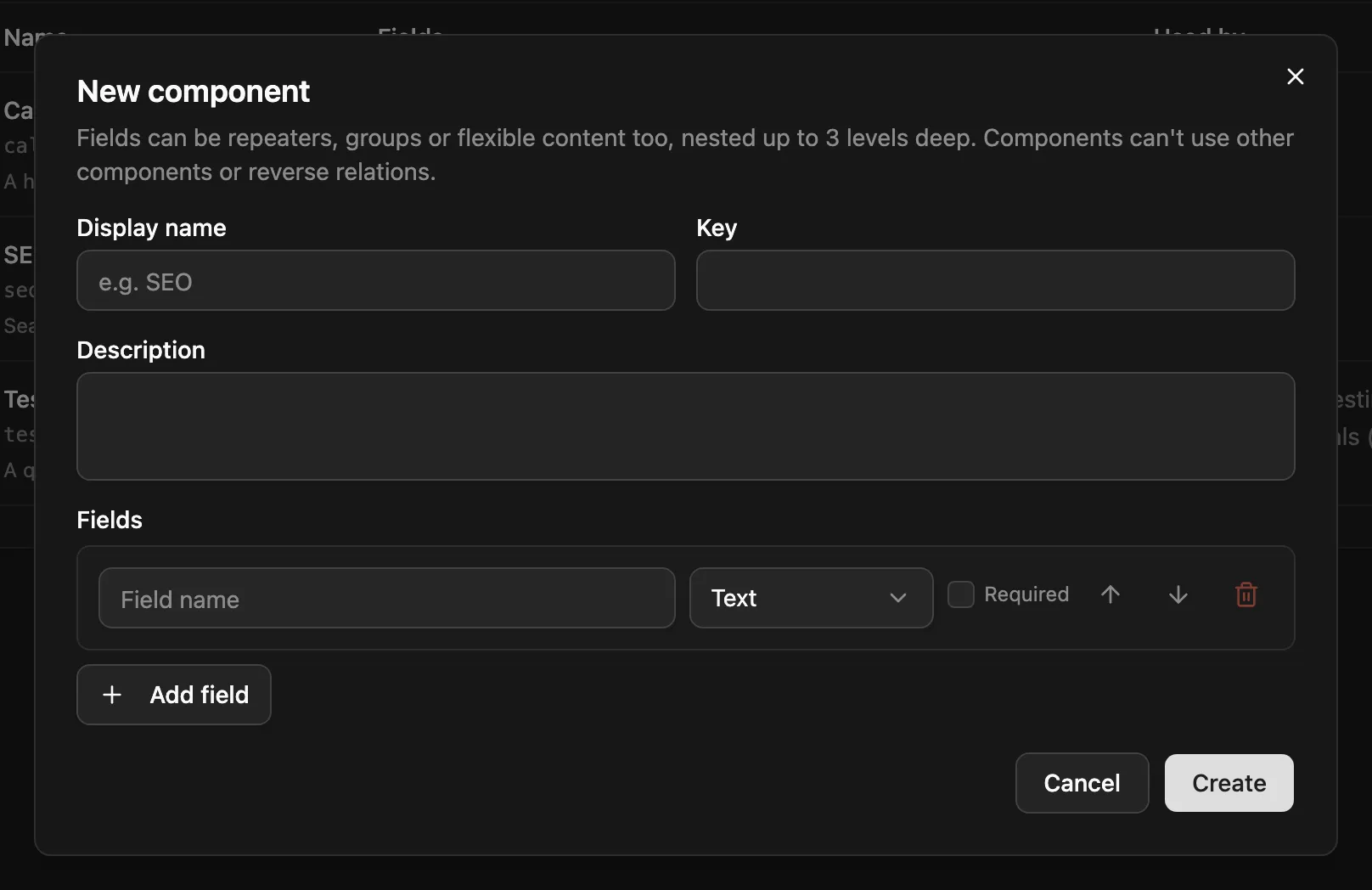
Create components under Content → Components (admins only). A component’s fields can be any type, including repeaters, groups and flexible fields.
Four ways to use a component
Section titled “Four ways to use a component”In the content type editor, click Add component, pick one and choose how to use it:
| Use | You get | Entry data |
|---|---|---|
| One | a group field holding the component’s fields |
"seo": { "meta_title": "…" } |
| Many | a repeater field, each row holding the component’s fields |
"links": [{ "label": "…", "url": "…" }] |
| Inline | the component’s fields added at the top level, with no wrapper | "full_name": "Ada" |
| Flexible layout | a layout of a flexible field, built from the component | "body": [{ "_layout": "cta", … }] |
In a flexible field
Section titled “In a flexible field”Under a flexible field’s layouts, Add layout from component asks the same question, plus the layout’s name:
| Use | The layout holds | Section data |
|---|---|---|
| One | one group field with the component’s fields |
{ "_layout": "featured", "review": { "name": "…" } } |
| Many | one repeater field, each row holding the component’s fields |
{ "_layout": "reviews", "items": [{ "name": "…" }] } |
| Inline | the component’s fields directly | { "_layout": "testimonial", "name": "…" } |
The layout name is suggested from the component and avoids names the field already has, so the same component can become several layouts (testimonial, testimonial_2). In the schema, One and Many are a group or repeater with options.component inside the layout:
{ "name": "sections", "type": "flexible", "options": { "layouts": [ { "name": "reviews", "label": "Reviews", "fields": [ { "name": "heading", "type": "text" }, { "name": "items", "type": "repeater", "options": { "component": "review" } } ] }] } }Example
Section titled “Example”A testimonial component with three fields:
{ "name": "testimonial", "displayName": "Testimonial", "fields": [ { "name": "quote", "type": "textarea", "required": true }, { "name": "author", "type": "text" }, { "name": "role", "type": "text" } ]}Used four ways in content type schemas:
// One: a group field{ "name": "featured_testimonial", "type": "group", "options": { "component": "testimonial" } }
// Many: a repeater field{ "name": "testimonials", "type": "repeater", "options": { "component": "testimonial" } }
// Inline: each field is tagged with the component (the editor adds these for you){ "name": "quote",  "type": "textarea", "component": "testimonial" }{ "name": "author", "type": "text",     "component": "testimonial" }{ "name": "role",   "type": "text",     "component": "testimonial" }
// Flexible layout: name and label default to the component's{ "name": "body", "type": "flexible",  "options": { "layouts": [{ "component": "testimonial" }, { "name": "text", "fields": [ … ] }] } }
The entry data for the repeater looks exactly like an ordinary repeater:
"testimonials": [ { "_id": "x1y2z3", "quote": "Setup took ten minutes.", "author": "Priya", "role": "CTO" }]How it works
Section titled “How it works”When a content type is saved, the server copies the component’s fields into it: into the group’s or repeater’s sub-fields, into the layout, or into the inline fields. The API, GraphQL and the generated TypeScript types therefore see ordinary fields, and your frontend doesn’t need to know components exist.
Those copies are managed by the server. Edit the component, not the copies: when you save a component, every content type that uses it, in any of the four ways, is updated and gets a new schema version.
Inline components
Section titled “Inline components”Inline keeps entry data flat. A content type using a person_details component inline stores { "full_name": "Ada", "gender": "female" } instead of a nested object.
- A content type can use a given component inline only once.
- The inline fields’ names must not clash with the content type’s other fields. A clash is refused with
400. - In the editor, inline fields appear as one read-only From component block that moves as a unit.
Renaming a component’s fields
Section titled “Renaming a component’s fields”Renaming a field in the Components editor moves the stored values too, in every content type using the component. Through the API, send fieldMigrations with the component’s field names:
{ "fields": [ … ], "fieldMigrations": { "renames": [{ "from": "title", "to": "heading" }] }}This includes uses inside flexible layouts: a rename in the Review component above moves sections[].items[].name too. Fields you retype or remove keep their stored values. See Schema changes for how migrations work.
The Components section
Section titled “The Components section”The content type editor lists the component fields (group, repeater and inline uses) in their own Components section below the ordinary fields. The entry editor shows each one as a titled box you can fold away.
This only affects the display. The schema order and the entry JSON don’t change: each component is still a top-level key like "testimonial": { … }.
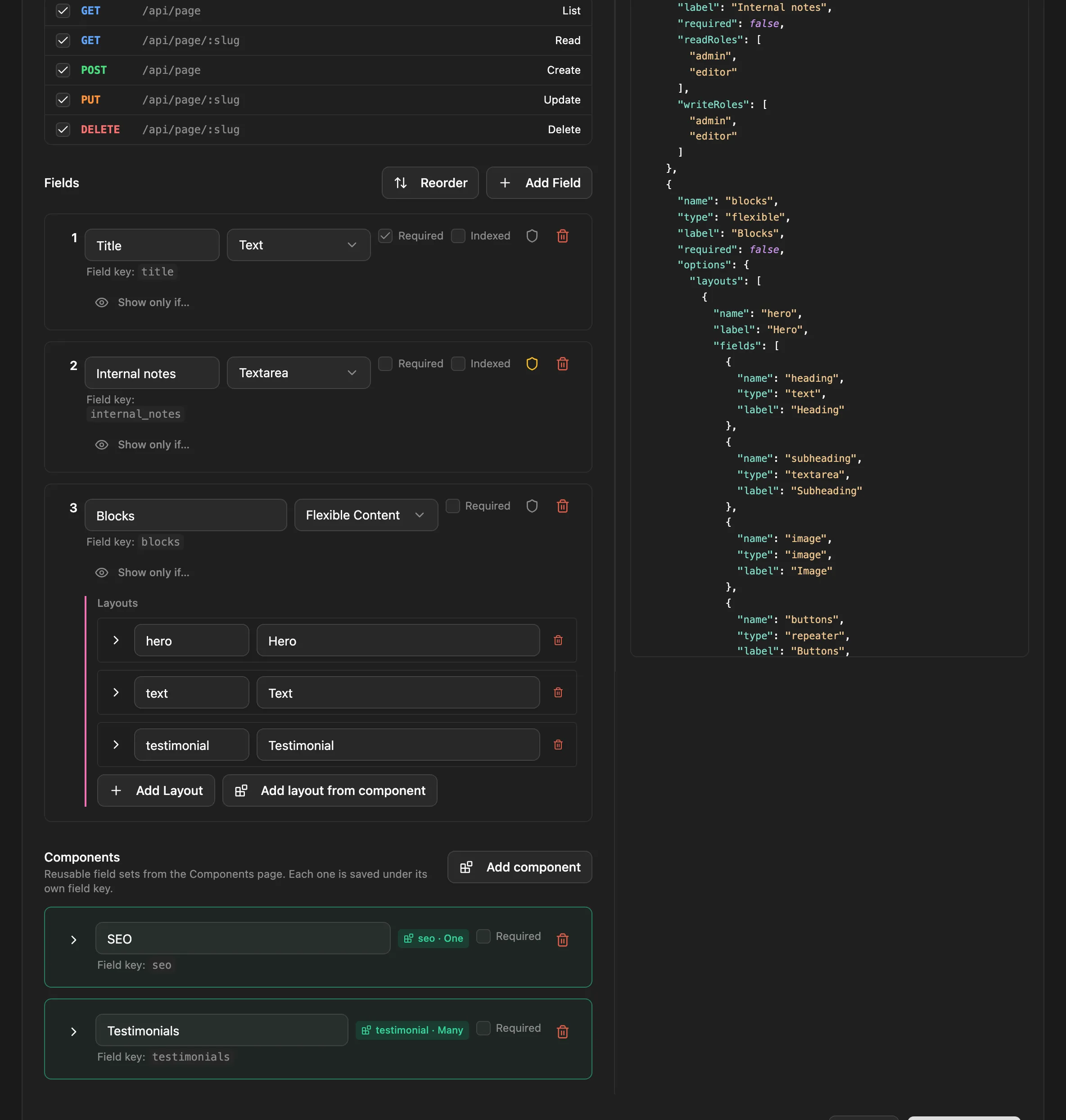
Each field needs its own key, so a component can be used twice only under different names. Adding a component a second time suggests a free name (Testimonial 2 → testimonial_2), and the editor won’t save while two fields share a key.
- Components are referenced by top-level fields only — or by a group or repeater directly in a layout of a top-level flexible field. A repeater inside a repeater can’t use a component.
- Layout names must be unique within a flexible field; the content type editor flags duplicates as you type, at every level.
- A component’s fields can nest repeaters, groups and flexible fields, but count the group, repeater or layout that uses the component as the first of the three levels.
- A component can’t contain other components or reverse relations.
- Using a component name that doesn’t exist is refused with
400. Deleting a component that is in use is refused with409. - Schema exports include the components the exported content types use, and imports create them first.
| Endpoint | Does | Who |
|---|---|---|
GET /api/components |
lists components | any signed-in user |
GET /api/components/:id |
one component, with usage[]: each content type and field using it, and how |
any signed-in user |
POST /api/components |
creates one: { name, displayName?, description?, fields } |
admin |
PUT /api/components/:id |
updates it and every content type using it; returns updatedContentTypes and any propagationErrors |
admin |
DELETE /api/components/:id |
deletes it (409 while in use) |
admin |