Permissions
Permissions decide what each role can do in the admin. They work per module: for every part of the admin (Content, Media library, Forms, Users, Webhooks, …) a role has one of three levels.
| Level | Means |
|---|---|
| No access | The module is hidden from the sidebar, its pages redirect to the dashboard and its API routes return 403 |
| View | The role can open the module and read everything in it, but every change is refused. Settings pages show their fields read-only |
| Edit | The role can read and change everything in the module |
Admins always have edit on every module. Only admins can change permissions.
The permissions page
Section titled “The permissions page”Open Users and click Manage permissions, or go to Users → Roles and click Edit permissions. The Module access tab shows one list per role: pick the role at the top, then choose a level for each module. Changes save right away.
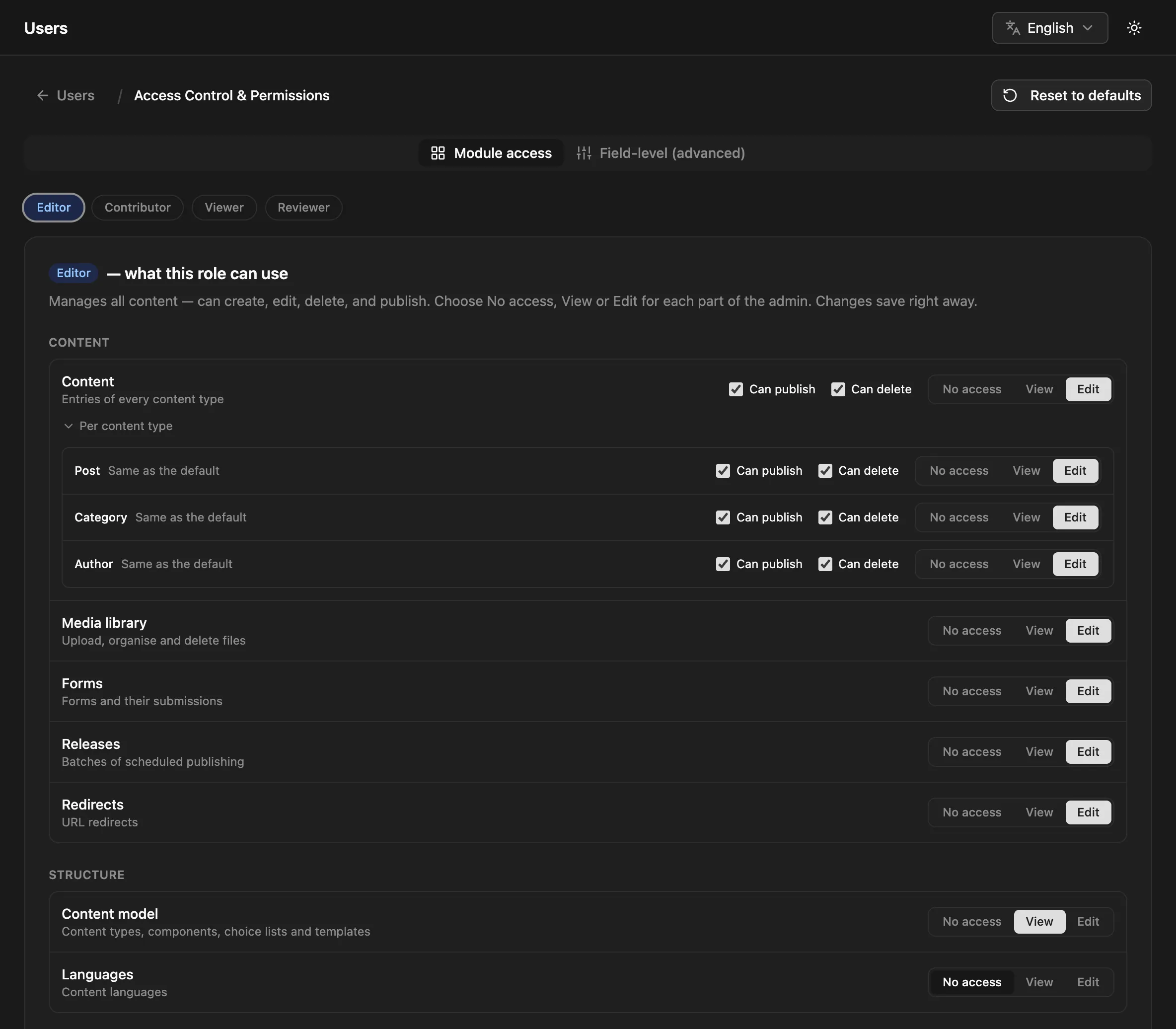
- Modules are grouped into Content, Structure, Team & developer, Settings and Plugins.
- Users, API keys, Plugins and Server settings carry a warning: edit on those is close to admin access (a role could create an API key with
allaccess, turn on a plugin, or point email at another server). - Reset to defaults restores the built-in levels and content permissions for every role.
The other tab, Field-level (advanced), controls single fields. See Field access.
Modules
Section titled “Modules”| Module | Covers | editor | contributor | viewer |
|---|---|---|---|---|
| Content | Entries of every content type | edit | edit | view |
| Media library | Upload, organise and delete files | edit | view | view |
| Forms | Forms and their submissions | edit | ||
| Releases | Batches of scheduled publishing | edit | view | view |
| Redirects | URL redirects | edit | ||
| Content model | Content types, components, choice lists and templates | view | view | view |
| Languages | Content languages | |||
| Users | Invite people and change their roles | |||
| API keys | Keys for the public API | |||
| Webhooks | Webhooks and their deliveries | |||
| Jobs | Background jobs | |||
| Audit log | Who changed what | |||
| Plugins | Turn plugins on and off and change their settings | |||
| Import | WordPress import | |||
| Brand | Name, logo and colours | |||
| Server settings | Email, storage and search |
An empty cell is No access. These are the defaults; you can change any of them. A custom role starts with its base role’s column.
Some things stay admin-only whatever the levels say: managing roles and permissions, uploading, installing and deleting plugin packages, restarting the server, and permanently deleting entries from the trash.
Plugins can add their own modules. EcommPress, for example, adds Commerce. A plugin’s module is listed under Plugins while the plugin is enabled. Plugin authors declare them with adminModules in the manifest; see Building plugins.
Content
Section titled “Content”The Content row has more than read and write:
- View allows reading entries.
- Edit allows creating and editing them, and shows two more switches: Can publish (publish, stage, archive and schedule, in the editor, in bulk and in releases) and Can delete (move to the trash and restore from it).
Click Per content type to give a content type its own setting, such as an editor who may only publish blog posts, or a contributor kept out of pages. A content type follows the role’s default until you change it; Use default removes its own setting.
Underneath, content access is stored as actions: read (view), create + update (edit), publish and delete.
| Action | Checked when a user… |
|---|---|
read |
exports entries |
create |
creates an entry or a translation, in the admin, through GraphQL or the public write API, or imports new rows |
update |
saves an entry, restores a version, gets a preview link, or imports over existing rows |
delete |
moves an entry to the trash or restores it, one at a time or in bulk |
publish |
publishes, stages or archives an entry: on create, on save, by promoting it, in bulk, by import, or in a release |
A release checks publish on the role’s default (*), because one release can touch many content types.
How a content check is resolved
Section titled “How a content check is resolved”For a user with role R acting on content type T:
- If
Risadmin, allow. - If
Rhas a setting forT, use it. - Otherwise, if
Rhas a default (*), use it. - Otherwise, if
Ris a custom role, check its base role the same way. - Otherwise, use the built-in defaults: editor gets every action, contributor
create,readandupdate, viewerread.
All routes need an admin JWT.
| Method | Path | Body | What it does |
|---|---|---|---|
GET |
/api/roles/access |
Every module (core and plugin) and every role’s levels | |
PUT |
/api/roles/access/:role |
{ "modules": { "forms": "view", … } } |
Sets levels for one role; modules left out keep theirs |
GET |
/api/permissions |
All content permission rows | |
GET |
/api/permissions/:role |
One role’s content rows | |
PUT |
/api/permissions/:role/:contentType |
{ "actions": [...] } |
Sets content access for a type, or * for the default |
DELETE |
/api/permissions/:role/:contentType |
Removes a content type’s setting; the role falls back as above | |
PUT |
/api/permissions/reset/all |
Resets every role’s module levels and content permissions |
# Editors can see the jobs queue but not retry jobscurl -X PUT https://cms.example.com/api/roles/access/editor \  -H "Authorization: Bearer $TOKEN" -H "Content-Type: application/json" \  -d '{ "modules": { "jobs": "view" } }'
# …and may publish only blog postscurl -X PUT 'https://cms.example.com/api/permissions/editor/*' \  -H "Authorization: Bearer $TOKEN" -H "Content-Type: application/json" \  -d '{ "actions": ["create", "read", "update", "delete"] }'curl -X PUT https://cms.example.com/api/permissions/editor/blog \  -H "Authorization: Bearer $TOKEN" -H "Content-Type: application/json" \  -d '{ "actions": ["create", "read", "update", "delete", "publish"] }'
Levels are none, view and edit. Content isn’t set through /roles/access (use /permissions). Setting either for admin, or for a role that doesn’t exist, returns 404; an unknown module or level returns 400.
A signed-in user’s own access comes back from GET /api/auth/me as access: { modules, content }; the admin builds its sidebar from it.
Where permissions apply
Section titled “Where permissions apply”- Every admin API route, REST and GraphQL. The sidebar and page routing follow the same levels, but the API is what enforces them.
- The public write API (
POST,PUT,DELETE /api/:type) when the caller uses a login token. A create defaults to published, so it also needspublishunless the body sets"status": "draft".
API keys don’t have a role. Their access is set on the key itself.