Authentication
Users sign in to the admin with an email and password, or through single sign-on. A successful sign-in gives them a short-lived access token for API calls and a long-lived refresh cookie that gets a new access token when the old one runs out.
This page covers the flows and the endpoints behind them, for anyone building their own login or calling the API as a user. For machine access, use API keys instead.
First run: creating the admin
Section titled “First run: creating the admin”A fresh install has no users. The admin redirects to /setup, where you enter a site name, an admin email and a password. That creates the first account, with the admin role.
| Endpoint | What it does |
|---|---|
GET /api/auth/setup-status |
{ "required": true } while no user exists |
POST /api/auth/register |
{ email, password } creates the first admin and returns an access token |
POST /api/auth/register works only while there are no users. After that it returns 409, and new users are invited by an admin.
Signing in
Section titled “Signing in”curl -X POST https://cms.example.com/api/auth/login \ -H "Content-Type: application/json" \ -c cookies.txt \ -d '{ "email": "admin@example.com", "password": "…" }'{ "access_token": "eyJhbGciOi…", "user": { "id": 1, "email": "admin@example.com", "role": "admin" }}- Emails are matched case-insensitively.
- Wrong email and wrong password give the same
401“Invalid credentials”. - For a user with a custom role,
roleis the role it’s based on andcustomRoleis its name. - In production, login allows 10 attempts per minute per IP address.
If the user has two-factor authentication turned on, the response is different; see Two-factor authentication.
Access tokens
Section titled “Access tokens”Send the access token on every API call:
curl -H "Authorization: Bearer eyJhbGciOi…" https://cms.example.com/api/auth/meGET /api/auth/me returns the signed-in user. The token is a JWT signed with JWT_SECRET, and it’s valid for JWT_EXPIRES_IN (default 7d).
The user’s role is looked up on every request, so a role change takes effect on their next call, and a deleted user’s tokens stop working.
Refresh cookie
Section titled “Refresh cookie”Sign-in also sets an HttpOnly cookie, np_refresh, valid for 30 days. It’s only sent to /api/auth/*, and it’s Secure in production.
| Endpoint | What it does |
|---|---|
POST /api/auth/refresh |
Exchanges the cookie for a new access token. The refresh token is rotated: the old one stops working and a new cookie is set. |
POST /api/auth/logout |
Deletes the refresh token and clears the cookie |
The admin calls /api/auth/refresh by itself when an API call returns 401, so people stay signed in for up to 30 days of inactivity. After that, or after signing out, they sign in again.
Password reset
Section titled “Password reset”- On the login page, the user clicks Forgot password? and enters their email.
- NodePress emails a reset link to
/reset-password?token=…, valid for 15 minutes. - The user sets a new password (at least 8 characters).
| Endpoint | Body | What it does |
|---|---|---|
POST /api/auth/forgot-password |
{ email } |
Sends the reset email. Always answers with the same message, so it doesn’t reveal which emails exist. |
POST /api/auth/reset-password |
{ token, password } |
Sets the new password, or 400 for an invalid, used or expired token |
A reset signs the user out everywhere: all their refresh tokens are deleted. Requesting a new link makes earlier ones stop working. Both endpoints allow 5 requests per minute per IP in production.
Signed-in users change their own password with PUT /api/users/me/password ({ currentPassword, newPassword }).
Two-factor authentication
Section titled “Two-factor authentication”Two-factor authentication (2FA) adds a 6-digit code from an authenticator app (Google Authenticator, 1Password, Authy…) to the password.
Turning it on
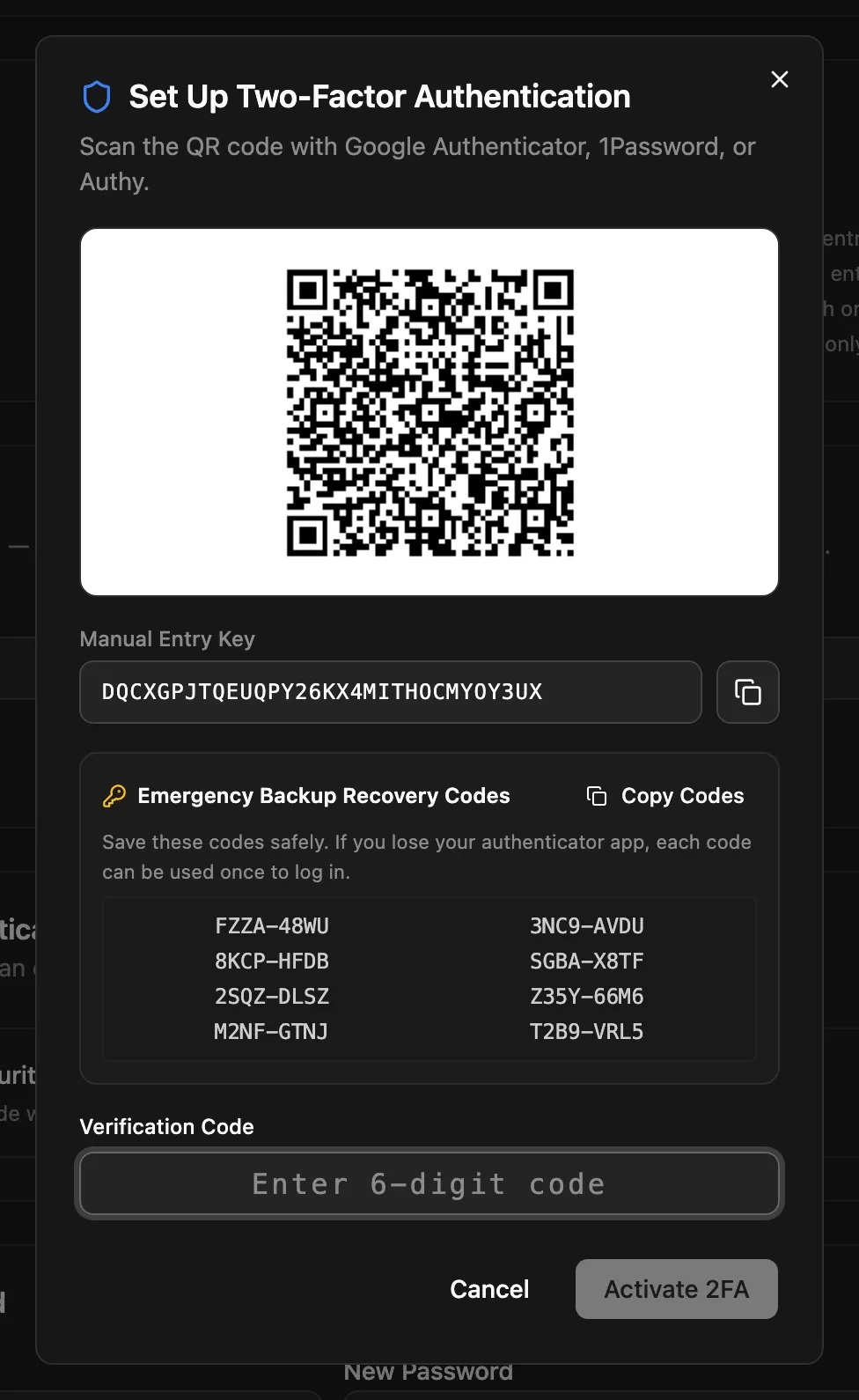
Section titled “Turning it on”In the admin, the Two-Factor Authentication (2FA) card is on the Users page:
- Click Enable 2FA.
- Scan the QR code with your authenticator app, or type the Manual Entry Key.
- Save the 8 Emergency Backup Recovery Codes. Each one works once, if you lose the app.
- Enter a code from the app and click Activate 2FA.
To turn it off, click Disable 2FA and enter a code from the app or a recovery code.
Signing in with 2FA
Section titled “Signing in with 2FA”For a user with 2FA, POST /api/auth/login doesn’t return a session. It returns a temporary token, valid for 5 minutes:
{ "requires2fa": true, "tempToken": "eyJhbGciOi…" }Send it with a code from the app, or a recovery code (XXXX-XXXX):
curl -X POST https://cms.example.com/api/auth/2fa/verify-login \ -H "Content-Type: application/json" -c cookies.txt \ -d '{ "tempToken": "eyJhbGciOi…", "code": "123456" }'The response is the same as a normal login, and sets the refresh cookie. When a recovery code was used, it also has "recoveryUsed": true and remainingRecoveryCodes. A used recovery code can’t be used again.
2FA endpoints
Section titled “2FA endpoints”All but verify-login need the user’s access token.
| Method | Path | Body | What it does |
|---|---|---|---|
GET |
/api/auth/2fa/status |
{ "enabled": true } or false |
|
GET |
/api/auth/2fa/setup |
A new secret, otpauthUrl (for the QR code), recoveryCodes and hashedRecoveryCodes. Nothing is saved yet. |
|
POST |
/api/auth/2fa/enable |
{ secret, code, recoveryCodes } |
Turns 2FA on once code matches secret. Send the hashedRecoveryCodes from setup as recoveryCodes. |
POST |
/api/auth/2fa/disable |
{ code } |
Turns 2FA off, with an app code or a recovery code |
POST |
/api/auth/2fa/verify-login |
{ tempToken, code } |
Completes a 2FA sign-in |
Codes are standard TOTP (SHA-1, 6 digits, 30-second steps); a code from the step before or after is accepted too, to allow for clock drift.
People who sign in through SSO aren’t asked for a NodePress 2FA code. Enforce two-factor at your identity provider instead.
Summary of endpoints
Section titled “Summary of endpoints”| Method | Path | Auth |
|---|---|---|
GET |
/api/auth/setup-status |
none |
POST |
/api/auth/register |
none (first user only) |
POST |
/api/auth/login |
none |
POST |
/api/auth/refresh |
refresh cookie |
POST |
/api/auth/logout |
refresh cookie |
GET |
/api/auth/me |
access token |
POST |
/api/auth/forgot-password |
none |
POST |
/api/auth/reset-password |
reset token in the body |
GET, POST |
/api/auth/2fa/… |
see above |
PUT |
/api/users/me/password |
access token |