Webhooks
A webhook sends an HTTP POST to a URL of yours when something happens in NodePress: an entry is published, a file is uploaded, a release goes out. Use them to rebuild a static site, sync a search index, or notify a chat channel. Deliveries are queued, signed if you set a secret, and retried when your endpoint fails.
Webhooks are managed by admins.
Creating a webhook
Section titled “Creating a webhook”- Open Developer → Webhooks and click Add Webhook.
- Give it a name and an Endpoint URL.
- Optionally set a Signing Secret. NodePress then signs every delivery so you can check it came from your site.
- Pick the Trigger Events, or All Events (Wildcard).
- Click Register Webhook.
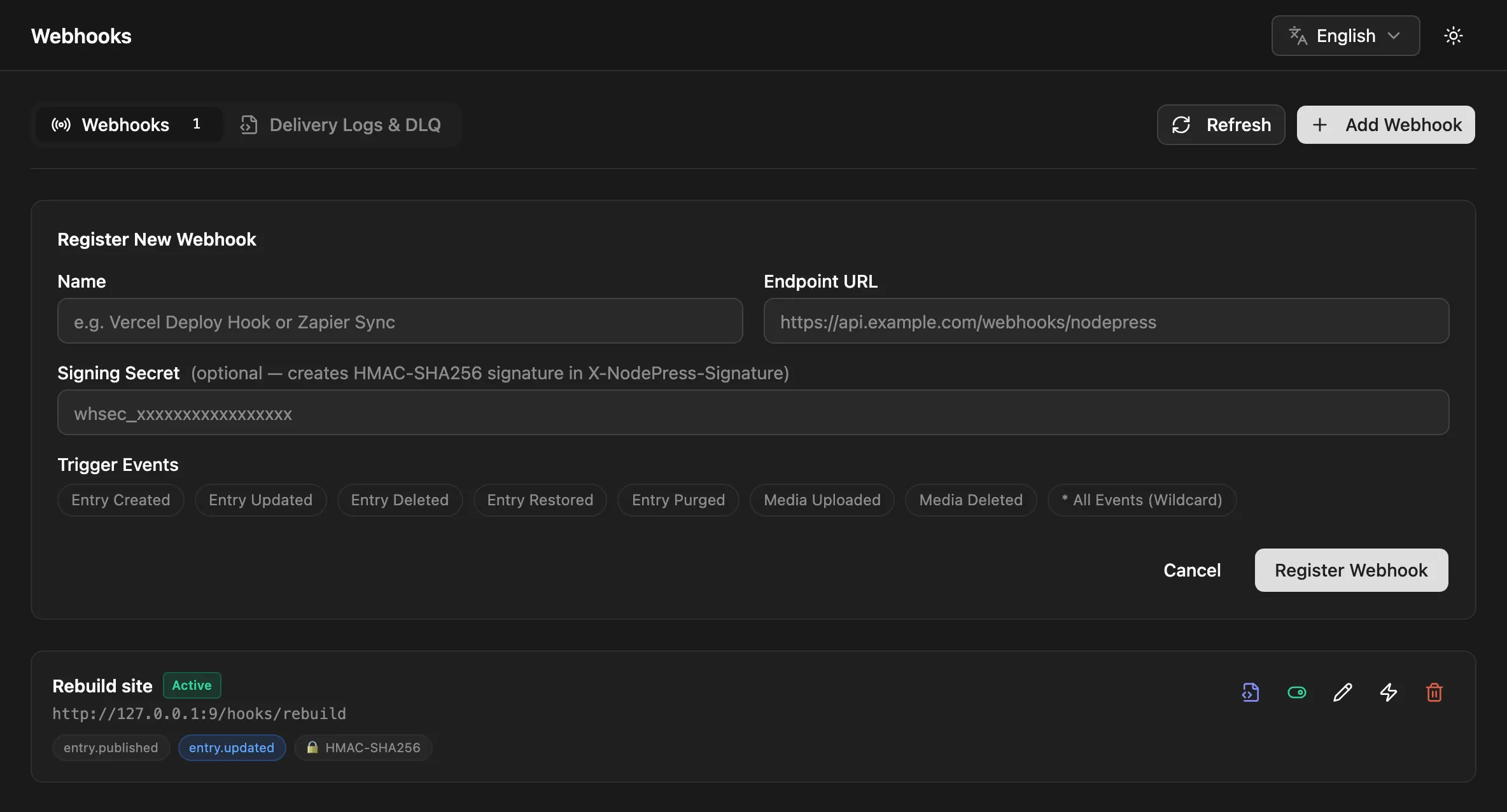
Each webhook can be edited, disabled and enabled again, or deleted from the same page.
Through the API, with an admin’s token:
curl -X POST http://localhost:3000/api/webhooks \ -H "Authorization: Bearer <admin JWT>" \ -H "Content-Type: application/json" \ -d '{ "name": "Rebuild site", "url": "https://deploy.example.com/hooks/nodepress", "secret": "a-long-random-string", "events": ["entry.published", "entry.updated", "entry.deleted"] }'| Field | Required | Notes |
|---|---|---|
name |
yes | a label for you |
url |
yes | where deliveries are sent |
events |
yes | event names, or ["*"] for all |
secret |
no | enables the X-NodePress-Signature header |
enabled |
no | default true |
| Method | Path | Does |
|---|---|---|
GET |
/api/webhooks |
list webhooks (page, limit) |
POST |
/api/webhooks |
create one |
PATCH |
/api/webhooks/:id |
change any field |
PATCH |
/api/webhooks/:id/toggle |
{ "enabled": false } to pause, true to resume |
POST |
/api/webhooks/:id/ping |
send a test ping |
DELETE |
/api/webhooks/:id |
delete it |
GET |
/api/webhooks/deliveries |
the delivery log (below) |
POST |
/api/webhooks/deliveries/:id/retry |
re-deliver one delivery now |
Events
Section titled “Events”| Event | Sent when | data |
|---|---|---|
entry.created |
an entry, or a translation of one, is created (admin or API) | { id, slug, status, contentType } (+ locale for a translation) |
entry.updated |
an entry is saved; a scheduled entry publishes; a release changes an entry to anything but published; a version is restored | { id, slug, status, contentType } |
entry.deleted |
an entry is moved to the trash | { id, slug } |
entry.restored |
an entry is restored from the trash | { id, slug } |
entry.purged |
an entry is deleted permanently | { id, slug } |
entry.staged |
an entry is promoted to staging |
{ id, slug, status, contentType, locale } |
entry.published |
an entry is promoted to published, or published by a release |
{ id, slug, status, contentType, locale } |
entry.promoted |
an entry is promoted to any stage | { id, slug, previousStatus, status, contentType, locale } |
release.published |
a release is applied | { id, entries, skipped } |
media.uploaded |
a file is uploaded | { filename, originalName, url, webpUrl, size, width, height } |
media.deleted |
a file is deleted | { filename } |
A few payloads differ from the table: a scheduled publish sends { id, slug, status: "published", scheduledPublish: true }, and entries changed by a release send { id, slug, status, release } with the release’s ID.
idin entry events is the entry’s numeric ID, the one the admin API (/api/entries/:id) uses. Fetch the entry if you need its content or public UUID.contentTypeis the stored content type name, such asblog_post.- Saving an entry with a new status in the editor sends
entry.updated, notentry.published. To react to every publish, subscribe toentry.updatedtoo and checkstatus.
The admin form lists the most common events. entry.staged, entry.published, entry.promoted and release.published are available through the API or with the wildcard.
The request
Section titled “The request”Every delivery is a POST with a JSON body:
{ "event": "entry.updated", "timestamp": "2026-10-26T09:00:00.000Z", "data": { "id": 42, "slug": "hello-world", "status": "published", "contentType": "blog_post" }}timestamp is when the event was queued. It stays the same on automatic retries; a manual re-delivery sends the current time.
| Header | Value |
|---|---|
Content-Type |
application/json |
X-NodePress-Event |
the event name, e.g. entry.updated |
X-NodePress-Delivery |
a random ID for this attempt |
X-NodePress-Attempt |
1, 2 or 3 |
X-NodePress-Signature |
sha256=<hex>, when the webhook has a secret |
X-NodePress-Redelivery |
true, on a manual re-delivery |
Answer with any 2xx status within 10 seconds. Anything else, or no answer, counts as a failure.
Verifying the signature
Section titled “Verifying the signature”With a secret set, X-NodePress-Signature is sha256= followed by the hex HMAC-SHA256 of the raw request body, keyed with the secret. Compute it over the bytes you received, before parsing the JSON: re-serializing the parsed body can change spacing or key order and break the match.
import express from 'express';import { createHmac, timingSafeEqual } from 'node:crypto';
const app = express();const SECRET = process.env.NODEPRESS_WEBHOOK_SECRET!;
app.post('/hooks/nodepress', express.raw({ type: 'application/json' }), (req, res) => {  const expected = 'sha256=' + createHmac('sha256', SECRET).update(req.body).digest('hex');  const received = req.get('X-NodePress-Signature') ?? '';
  const ok =    received.length === expected.length &&    timingSafeEqual(Buffer.from(received), Buffer.from(expected));  if (!ok) return res.status(401).send('Bad signature');
const { event, data } = JSON.parse(req.body.toString('utf8')); // …handle the event res.sendStatus(204);});import { createHmac, timingSafeEqual } from 'node:crypto';
export async function POST(req: Request) { const body = await req.text(); const expected = 'sha256=' + createHmac('sha256', process.env.NODEPRESS_WEBHOOK_SECRET!).update(body).digest('hex'); const received = req.headers.get('x-nodepress-signature') ?? '';
if (received.length !== expected.length || !timingSafeEqual(Buffer.from(received), Buffer.from(expected))) { return new Response('Bad signature', { status: 401 }); } const { event, data } = JSON.parse(body); // …handle the event return new Response(null, { status: 204 });}The signature doesn’t cover a separate timestamp header. To ignore old or replayed deliveries, check the timestamp in the body.
Retries
Section titled “Retries”Deliveries go through a queue in the database, so a slow or failing endpoint never holds up the edit that caused it. Each delivery is tried up to three times:
| Attempt | When |
|---|---|
| 1 | right away |
| 2 | 5 minutes after the first failure |
| 3 | 30 minutes after the second failure |
After the third failure the delivery is marked failed and stays in the log for manual re-delivery. A delivery to a webhook that has since been disabled or deleted is marked failed without being sent.
Your endpoint may receive the same event more than once (for example, if it timed out after processing the request), so make handlers safe to repeat.
Every backend instance sends deliveries, up to WEBHOOK_CONCURRENCY (default 10) at a time. An instance started with QUEUE_WORKER=false doesn’t. See Scaling.
Delivery log
Section titled “Delivery log”The Delivery Logs & DLQ tab on the Webhooks page lists every delivery with its event, destination, attempts and time. Filter by All, Failed (DLQ), Delivered or Pending, or open one webhook’s log from its row. Inspect Payload & Error shows the payload, the response status and the error. Re-deliver sends the payload again immediately, as a new attempt with X-NodePress-Redelivery: true.
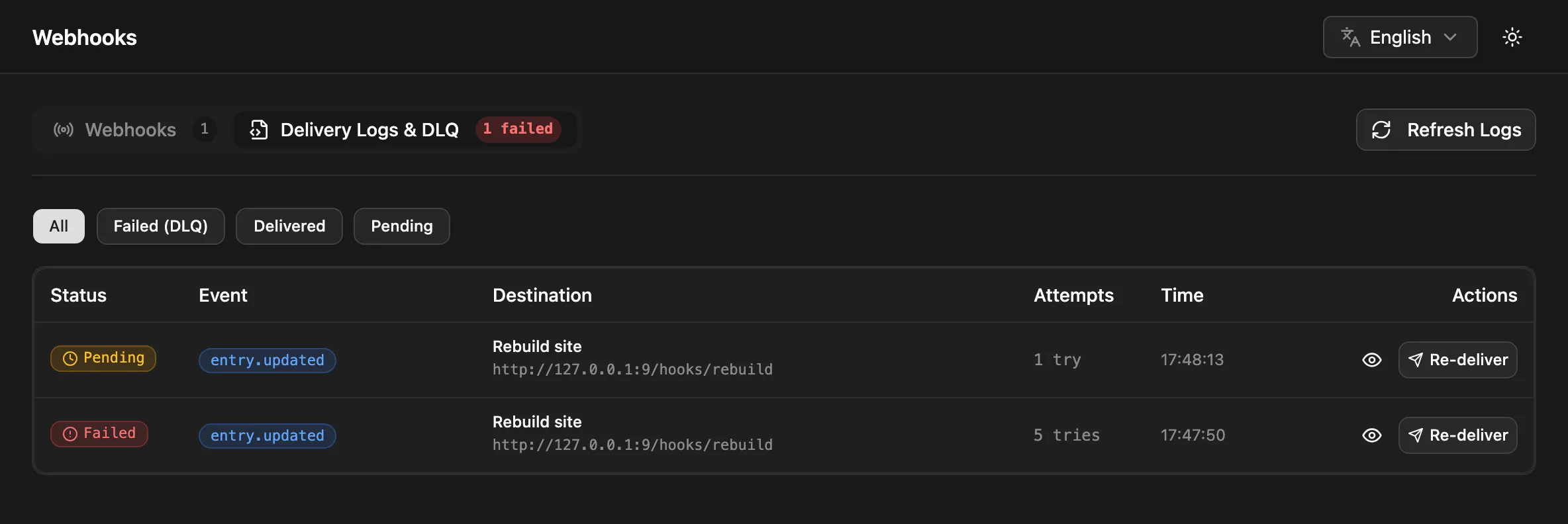
Through the API:
curl -H "Authorization: Bearer <admin JWT>" \ "http://localhost:3000/api/webhooks/deliveries?status=failed&webhookId=3"status is all, delivered, failed or pending; page and limit (default 25) page the results. Each delivery has id, webhookId, event, payload, status, attempts, responseStatus, errorMessage, the time fields and the webhook’s name and url.
Test pings
Section titled “Test pings”Send Test Ping on a webhook (or POST /api/webhooks/:id/ping) sends one request right away:
{ "event": "ping", "timestamp": "2026-10-26T09:00:00.000Z", "data": { "message": "Test ping from NodePress", "webhookId": 3, "webhookName": "Rebuild site" }}It’s signed like any other delivery, isn’t retried and doesn’t appear in the delivery log.