NodePress sends email through any SMTP server: your provider’s, a transactional service such as Resend, Postmark, Mailgun or SendGrid, or Gmail for testing. Set it up with environment variables or in the admin under Settings → Email & storage. Without it, NodePress still runs, but sends nothing.
What NodePress sends
Section titled “What NodePress sends”| When | Link valid for | |
|---|---|---|
| Password reset | Someone uses “forgot password” on the login page | 15 minutes |
| Invitation | An admin adds a user, or resends the invitation | 7 days |
| Form notification | A form with an email action gets a submission. See Forms. | |
| Test email | An admin clicks Send test |
Reset and invitation links point at SITE_URL, so set it to the admin panel’s public URL. Form notifications use the name, logo and color from Settings → Brand.
Set it up in the admin
Section titled “Set it up in the admin”Admins open Settings → Email & storage and fill in the Email card:
| Field | Meaning |
|---|---|
| Send emails | Turns email on or off. |
| SMTP server | Host name, such as smtp.resend.com. |
| Port | Usually 587, or 465 for SSL. |
| Security | STARTTLS (587) or SSL/TLS (465). |
| Username, Password | SMTP credentials. A saved password is never shown again; leave the field blank to keep it. |
| From address | The sender, such as Acme <noreply@acme.com>. |
Saved settings are used at once, with no restart. Send test sends a short message to the address in Send a test to, using the values in the form even before you save them. The setup wizard offers the same form as its second step.
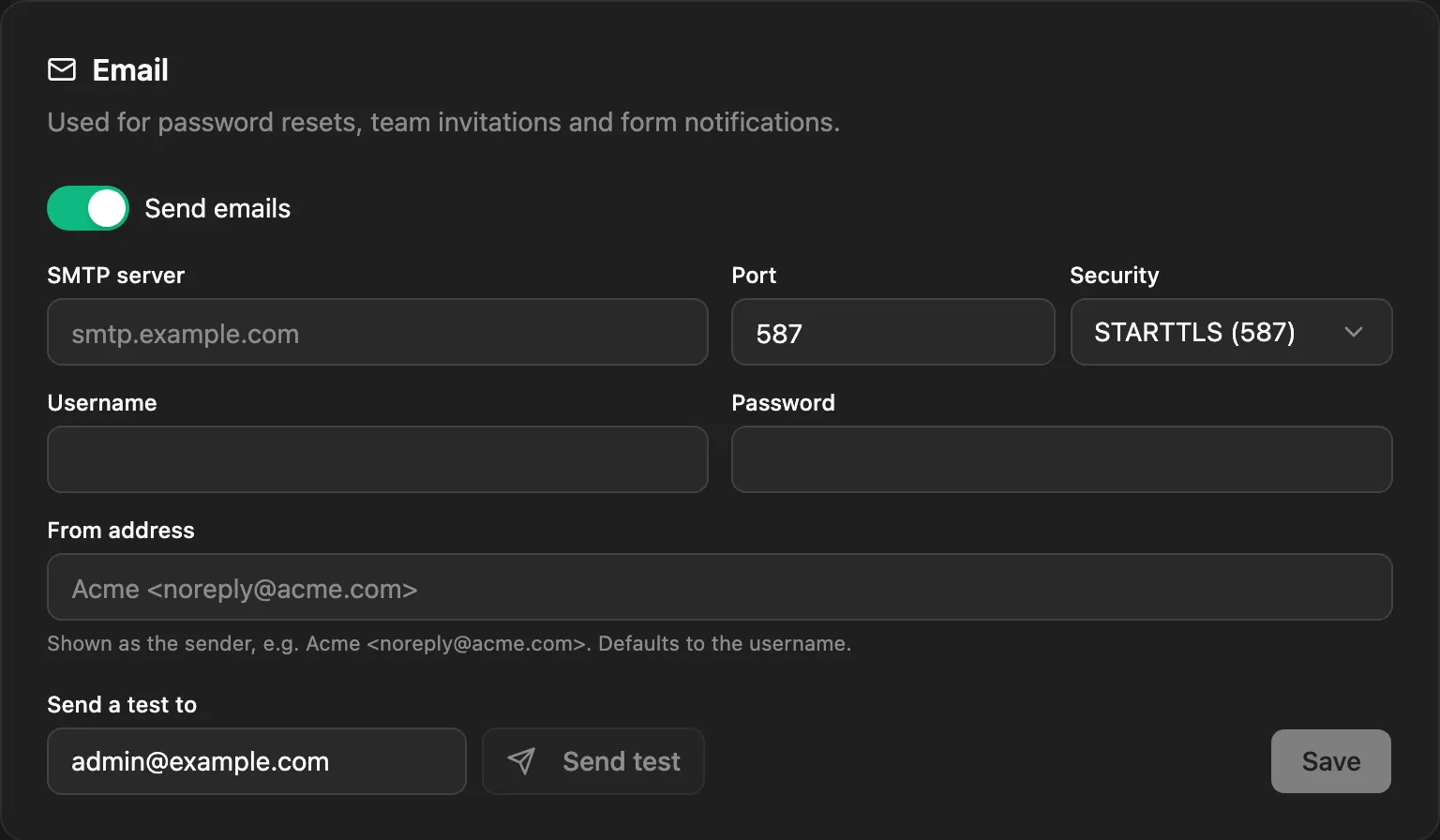
The password is stored encrypted, with a key derived from SETTINGS_SECRET (or JWT_SECRET when that isn’t set). If that secret changes, re-enter the password.
Set it up with environment variables
Section titled “Set it up with environment variables”SMTP_HOST=smtp.example.comSMTP_PORT=587SMTP_SECURE=false # true for port 465 (SSL), false for 587 (STARTTLS)SMTP_USER=apikeySMTP_PASS=...SMTP_FROM="Acme <noreply@example.com>"| Variable | Default | Meaning |
|---|---|---|
SMTP_HOST |
none | SMTP server. Setting it turns email on. |
SMTP_PORT |
587 |
Port. |
SMTP_SECURE |
false |
true for implicit TLS (port 465), false for STARTTLS. |
SMTP_USER, SMTP_PASS |
none | Credentials. Leave them out for a server without authentication. |
SMTP_FROM |
see below | Sender address. |
When SMTP_HOST is set, the environment wins: the admin’s Email card shows the settings read-only (without the password) and can only send a test.
The backend checks the SMTP connection at startup and logs a warning if it fails, but keeps running.
The sender address
Section titled “The sender address”Without a From address or SMTP_FROM, emails come from NodePress <username> when the username is an email address, or noreply@<SMTP host> otherwise. Most providers only accept a sender on a domain you’ve verified with them, so set one.
Gmail is fine for testing (it caps sending at a few hundred messages a day). It doesn’t accept your normal password: turn on 2-Step Verification for the account, create an App Password, and use the 16 characters without spaces as the password.
SMTP_HOST=smtp.gmail.comSMTP_PORT=587SMTP_SECURE=falseSMTP_USER=you@gmail.comSMTP_PASS=<16-character app password>Without email
Section titled “Without email”| Development | Production | |
|---|---|---|
| Password reset | The reset link is shown on screen | Nothing is sent. The link is only written to the backend’s log. |
| Invitation | The admin gets the link to copy | The admin gets the link to copy |
| Form notifications | Skipped | Skipped |
Set up email before you go live, or nobody can reset a forgotten password. An admin can still invite users and send them their link by hand. See Users and roles.
Delivery and retries
Section titled “Delivery and retries”Password resets and invitations are sent in the background, so a slow SMTP server never holds up the request. Form notifications are queued as background jobs: a failed send is retried after 1 minute and again after 10 minutes, and admins can see failed jobs on the Jobs page.