Releases
A release is a named batch of entry changes that go live together: publish these five entries, unpublish that one, archive an old page. You can apply a release by hand or schedule it, and every change in it happens in one database transaction, so visitors never see half of a launch.
Use releases for anything that must change at one moment: a product launch, a campaign, a site section going live.
Creating a release
Section titled “Creating a release”- Open Releases in the sidebar, type a name (for example “Spring launch”) and create it.
- Add entries to it:
- from the Entries list: select entries, click Add to release;
- from an entry’s editor: click Release in the toolbar.
- In the dialog, pick the release (or New release…) and what happens to the entries When the release goes out: publish, unpublish or archive them.
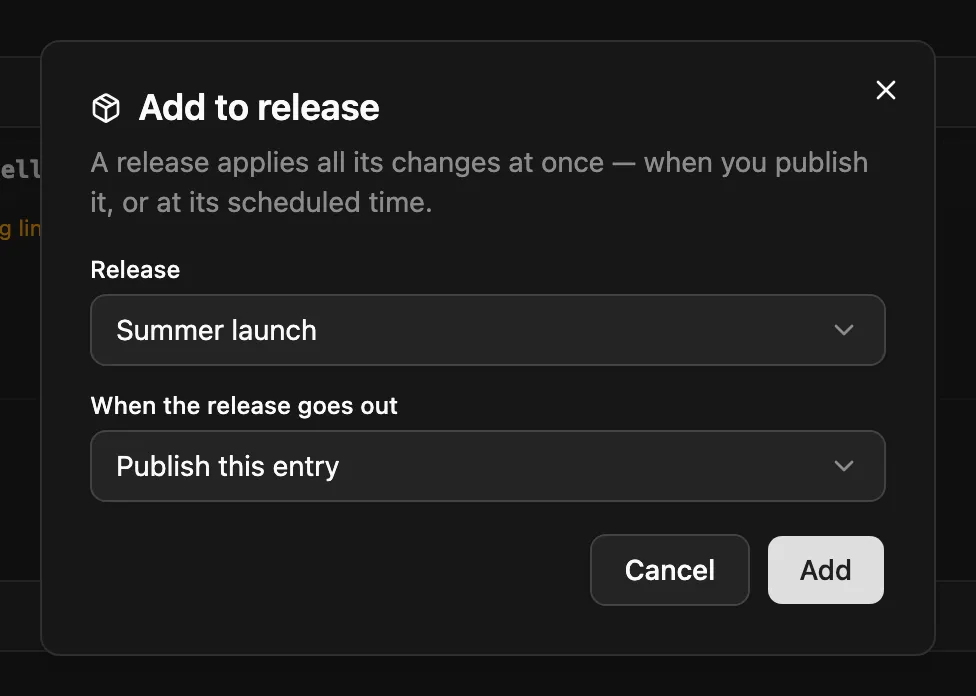
Each entry appears once per release. Adding an entry that’s already in the release changes its action. Remove an entry with Remove from release on the release’s page.
| Action | Status the entry gets |
|---|---|
| Publish | published (and any scheduled publish time is cleared) |
| Unpublish | draft |
| Archive | archived |
Entries go out as they are
Section titled “Entries go out as they are”A release doesn’t take a copy of the entries. It changes their status when it goes out, and they keep the content they have at that moment. Keep editing the drafts until then.
The release page shows each entry’s current status (now Draft, for example), and warns about entries that are also in another unpublished release: whichever release goes out last decides the entry’s final status.
Entries that are in the trash when the release goes out are skipped.
Publishing
Section titled “Publishing”On the release’s page:
- Publish now applies every change at once.
- Schedule sets a date and time in the future. The release then goes live by itself; NodePress checks every minute. Unschedule takes the time off again.
| Release status | Meaning |
|---|---|
| Open | Being prepared |
| Scheduled | Will go out at its scheduled time |
| Publishing | Being applied right now |
| Published | Done. It can’t be changed any more. |
| Failed | Nothing was changed. The release shows the reason; fix it and publish again. |
All changes are made in one transaction, so a release either applies completely or not at all. A plugin can stop a release from publishing an entry; the release then fails with Blocked by a plugin and the plugin’s message. A release left in Publishing for more than 10 minutes (for example because the server restarted) is marked Failed so you can publish it again.
Deleting a release removes the release only. Its entries stay exactly as they are.
When a release goes out, NodePress fires the entry.published or entry.updated webhook for each entry it changed, then release.published for the release.
Who can use releases
Section titled “Who can use releases”| Action | Who |
|---|---|
| See releases | Any signed-in user |
| Create, rename, delete, add and remove entries | Editors and admins |
| Publish or schedule | Admins, and editors whose role may publish (the publish permission on all content types) |
All endpoints need a login token.
| Method | Path | What |
|---|---|---|
GET |
/api/releases |
List releases, with itemCount |
GET |
/api/releases/:id |
A release with its items, each with its entry and any conflicts |
POST |
/api/releases |
Create: { "name": "Spring launch", "description": "…" } |
PATCH |
/api/releases/:id |
Change name or description |
DELETE |
/api/releases/:id |
Delete the release (entries are untouched) |
POST |
/api/releases/:id/items |
Add entries: { "entryIds": [12, 13], "action": "publish" } (up to 1,000; action defaults to publish) |
DELETE |
/api/releases/:id/items/:itemId |
Remove one entry |
PUT |
/api/releases/:id/schedule |
{ "scheduledAt": "2026-11-01T09:00:00.000Z" }, or null to unschedule |
POST |
/api/releases/:id/publish |
Publish now |
entryIds are the admin’s numeric entry IDs, as returned by /api/entries.