GraphQL
NodePress serves a GraphQL API next to REST. Every content type gets its own typed queries, built from its fields, so you select exactly the values you need and follow relations without populate. The schema updates itself when you change a content type.
Endpoint
Section titled “Endpoint”POST http://localhost:3000/graphqlGraphQL is at /graphql on the backend, not under /api. The admin proxies it too (http://localhost:5173/graphql in development).
curl -X POST http://localhost:3000/graphql \ -H "Content-Type: application/json" \ -d '{ "query": "{ blogPosts(limit: 5) { data { slug data { title } } } }" }'Playground
Section titled “Playground”Open /graphql in a browser to get the GraphQL Playground, with autocomplete and the full schema in the Docs panel. Admins find it in the admin under Developer → GraphQL Playground.
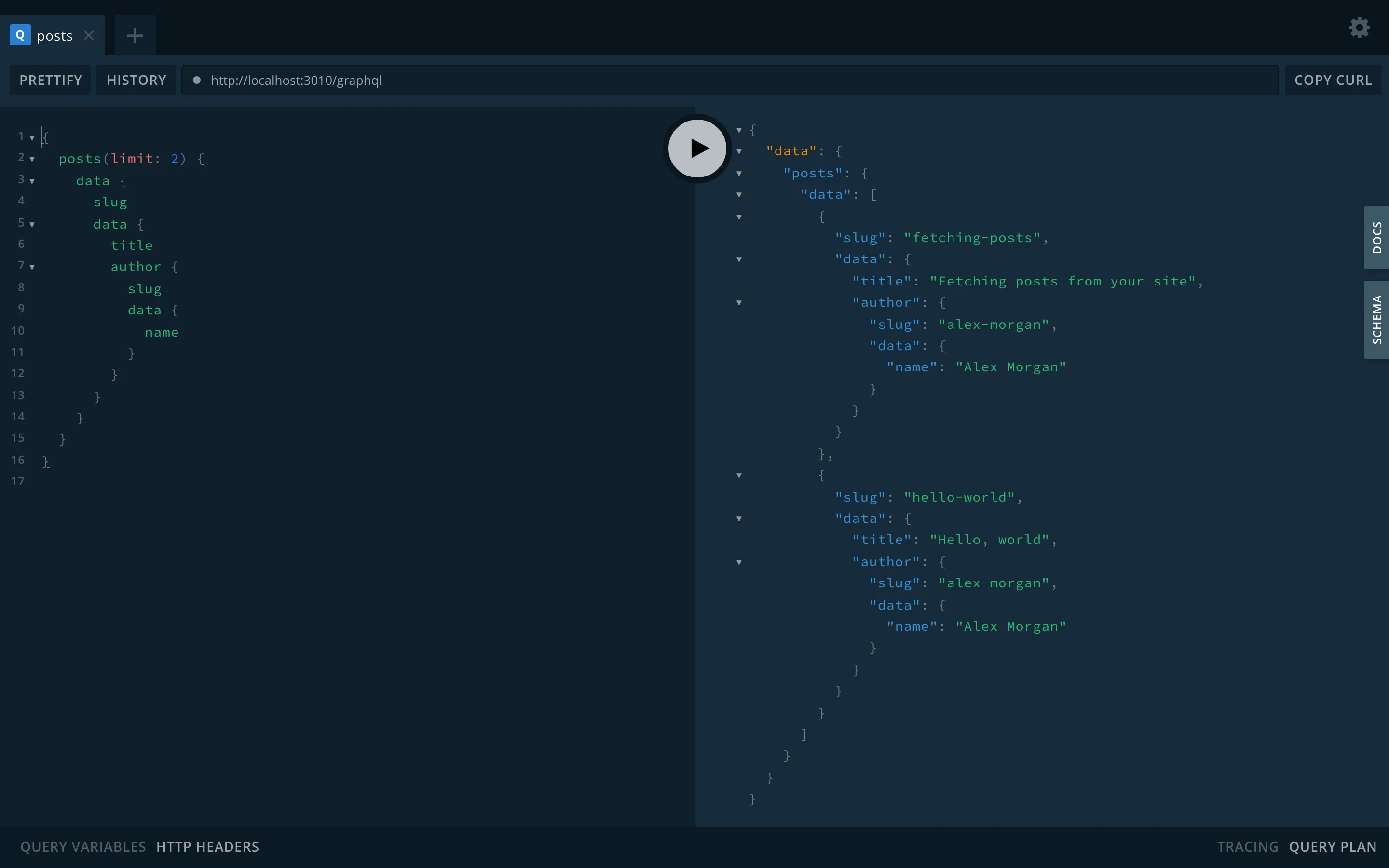
Typed queries per content type
Section titled “Typed queries per content type”For each content type, NodePress adds a single-entry query and a list query, named from the content type:
| Content type | Entry type | Single query | List query |
|---|---|---|---|
blog_post |
BlogPost |
blogPost(slug: …) |
blogPosts(…) |
category |
Category |
category(slug: …) |
categories(…) |
faq |
Faq |
faq(slug: …) |
faqs(…) |
Names are converted to PascalCase for types and camelCase for queries, and the list query is the English plural. A content type only gets the queries its API Endpoints allow (read for the single query, list for the list query), so a private content type has none.
{ blogPost(slug: "hello-world") { id slug locale createdAt data { title views cover { url alt } author { slug data { name } } } }}Every entry type has id (the public UUID), slug, locale, createdAt, updatedAt, seo (JSON) and data. The single query returns null when there’s no published entry with that slug.
Arguments
Section titled “Arguments”Single query:
| Argument | Type | Meaning |
|---|---|---|
slug |
String! |
the entry’s slug |
locale |
String |
language; default: the site’s default language |
fallback |
Boolean |
serve the default language when there’s no translation |
List query:
| Argument | Type | Meaning |
|---|---|---|
where |
JSON |
the same filters as REST where (Querying) |
search |
String |
full-text search |
sort |
String |
"createdAt:desc" (default), "updatedAt:asc", "slug:asc"… |
page |
Int |
page number |
limit |
Int |
1 to 100, default 20 |
cursor |
String |
meta.nextCursor of the previous page, instead of page |
locale, fallback |
as for the single query; without locale a list returns every language |
A list returns data and meta:
query Posts($where: JSON) { blogPosts(where: $where, sort: "createdAt:desc", limit: 10) { data { slug data { title } } meta { total page limit totalPages nextCursor } }}{ "where": { "featured": { "eq": true }, "author": { "slug": { "eq": "jane" } } } }where takes the same shape as the REST query string, written as JSON, including operators, OR/AND arrays and filters on related entries.
Field types
Section titled “Field types”Inside data, each field gets a GraphQL type from its field type:
| Field type | GraphQL type |
|---|---|
| text, textarea, rich text, color, date, datetime | String |
| number | Float |
| boolean | Boolean |
| select | String, or [String!] when multiple values are allowed |
| image | NodePressImage with url and alt |
| relation | the related entry type, or a list of them (see below) |
| json | JSON |
| group | an object type with the group’s fields |
| repeater | a list of item types, each with the repeater’s fields and _id |
| flexible | a list of a union of block types, one per layout (see below) |
Nested type names are built from the path: the seo_box group of BlogPost is BlogPostSeoBox, a links repeater’s items are BlogPostLinksItem.
Fields restricted with read roles are in the schema but always return null, since the typed queries serve what the public may read. See Field access.
Relations
Section titled “Relations”A top-level relation field resolves to the related entry type, so you select its fields directly:
{ blogPosts { data { slug data { author { slug data { name } } # cardinality: one categories { slug data { label } } # cardinality: many → a list } } }}Reverse fields resolve the same way and return the newest 100 linked entries. Related entries are always published ones, and each relation is loaded with one query for the whole response, however many entries ask for it.
A relation inside a group, repeater or flexible block stays an ID (or a list of IDs), as stored.
Flexible fields
Section titled “Flexible fields”A flexible field is a list of a union type. Each layout is one member, with its fields and _layout. Use inline fragments to pick fields per layout:
{ page(slug: "home") { data { blocks { __typename ... on PageBlocksHero { heading image { url } } ... on PageBlocksQuote { text author } } } }}The member names are the entry type, the field and the layout in PascalCase: layout hero of field blocks on page is PageBlocksHero. Blocks whose layout no longer exists in the schema are left out.
Drafts and authentication
Section titled “Drafts and authentication”The typed queries return published entries only, for every caller. There is no stage argument; use the REST API with credentials to read drafts (Stages). Sending a token doesn’t change what the typed queries return.
Admin queries and mutations
Section titled “Admin queries and mutations”The schema also has general queries and mutations that the admin side uses. They work with numeric entry IDs and take a signed-in user’s token as Authorization: Bearer <JWT>; API keys aren’t accepted.
| Operation | Who |
|---|---|
contentTypes, contentType(id) |
anyone: types open to the public API, without restricted fields; with a token, every type |
entries(contentTypeId, status, locale, search, page, limit), entry(id, populate) |
anyone: published entries of types open to the public API; with a token, every status and type |
createEntry, updateEntry, restoreEntryVersion, bulkSetPendingReviewEntries |
admin, editor, contributor |
deleteEntry, restoreEntry, bulkDeleteEntries, bulkPublishEntries, bulkArchiveEntries |
admin, editor |
purgeEntry, createContentType, updateContentType, deleteContentType |
admin |
webhooks, webhook, webhookDeliveries, createWebhook, toggleWebhook, pingWebhook, deleteWebhook |
admin |
Entry mutations also check the user’s permissions for the content type. createEntry and updateEntry take data as a JSON string:
mutation { createEntry(contentTypeId: 3, slug: "from-graphql", status: "draft", data: "{\"title\":\"Hello\"}") { id publicId status }}For your site, prefer the typed queries: they have real types, resolve relations and follow your content types’ API settings.
Limits
Section titled “Limits”- Queries nested deeper than 8 levels are rejected.
- GraphQL requests count toward the same per-IP rate limit as REST (120 per minute).
Schema updates
Section titled “Schema updates”The schema is rebuilt whenever a content type is created, changed or deleted, with no restart. With several backend instances, the others pick up the change within about 10 seconds.
A content type is left out of GraphQL, with a warning in the server log, if its name isn’t a valid GraphQL name or its type or query name is already taken.