Redirects
Redirects send visitors and search engines from an old address to a new one. You manage them in NodePress, and your site asks NodePress where a path should go. NodePress also adds a redirect by itself when a published entry’s slug changes.
Managing redirects
Section titled “Managing redirects”Open Redirects in the sidebar. Editors and admins can add, change and delete redirects.
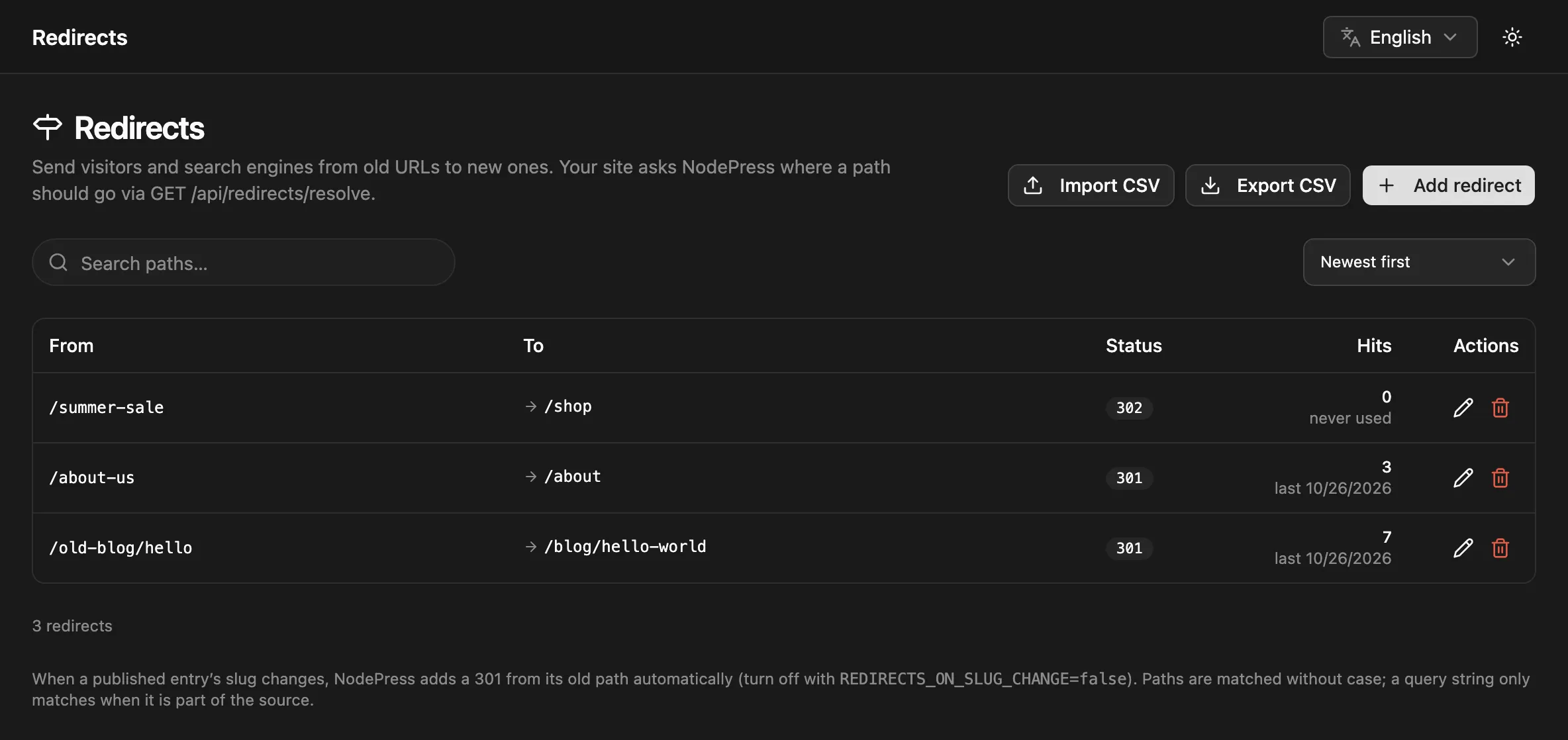
Click Add redirect and fill in:
| Field | What to enter |
|---|---|
| From | A path on your site, such as /old-page. A full URL is reduced to its path. |
| To | A path on your site (/new-page) or a full http(s) URL. Empty for Gone. |
| Status | One of the codes below. Default 301. |
| Code | Label | Use |
|---|---|---|
301 |
Moved permanently | The page moved for good (the usual choice) |
302 |
Found (temporary) | A temporary move |
307 |
Temporary, keeps method | A temporary move where the request method must stay the same |
308 |
Permanent, keeps method | A permanent move where the request method must stay the same |
410 |
Gone | The page was removed on purpose; there’s no target |
The list shows each redirect’s Hits and when it was last used, so you can tell which ones are still needed. You can search paths and sort by newest, most hits or source path.
How paths are matched
Section titled “How paths are matched”- The From path is stored without case:
/Aboutand/aboutare the same redirect. - Repeated slashes are collapsed and a trailing slash is dropped:
/blog/old/matches/blog/old. - A query string is only matched when you write it in From.
/old-pagematches/old-page?ref=mailtoo, and the query is carried over to a target that has none./old-page?ref=mailmatches only that exact query. #fragmentsare ignored, because browsers don’t send them.
Loops and chains
Section titled “Loops and chains”NodePress refuses a redirect that would create a loop (/a → /b → /a) or a chain of more than 5 redirects. Point redirects straight at the final page instead.
Automatic redirects on slug change
Section titled “Automatic redirects on slug change”When you change the slug of an entry that is published, or was published before, NodePress adds a 301 from its old path to the new one. It also points existing redirects that led to the old path straight at the new path, so no chain builds up, and removes any redirect away from the new path.
The paths come from the content type’s Preview URL when its path contains {slug} (and no {token}):
| Preview URL | Old slug → new slug | Redirect |
|---|---|---|
https://www.example.com/articles/{slug} |
hello → hello-world |
/articles/hello → /articles/hello-world |
(none), content type blog_post |
hello → hello-world |
/blog-post/hello → /blog-post/hello-world |
| (none), French entry, default language English | bonjour → bonjour-monde |
/fr/blog-post/bonjour → /fr/blog-post/bonjour-monde |
Without a usable Preview URL, the path is /{type}/{slug} with the content type in its URL form, prefixed with /{locale} for entries not in the default language. Set a Preview URL if your site’s paths look different.
To turn automatic redirects off, set REDIRECTS_ON_SLUG_CHANGE=false on the server.
Using redirects on your site
Section titled “Using redirects on your site”NodePress doesn’t serve your site, so your site has to ask. GET /api/redirects/resolve is public:
GET /api/redirects/resolve?path=/old-page{ "to": "/new-page", "statusCode": 301 }| Response | Meaning |
|---|---|
200 { "to": "/new-page", "statusCode": 301 } |
Redirect with that status |
200 { "to": null, "statusCode": 410 } |
The page is gone |
404 |
No redirect for this path |
Responses carry Cache-Control: public, max-age=60. NodePress also caches lookups itself, misses included, so calling it often is cheap. A common setup is to call it from your site’s middleware for paths that would otherwise be a 404. In Next.js:
import { NextResponse, type NextRequest } from 'next/server';
const CMS = process.env.NODEPRESS_URL!; // e.g. https://cms.example.com
export async function middleware(req: NextRequest) {  const path = req.nextUrl.pathname + req.nextUrl.search;  const res = await fetch(`${CMS}/api/redirects/resolve?path=${encodeURIComponent(path)}`);  if (!res.ok) return NextResponse.next();
  const { to, statusCode } = await res.json();  if (statusCode === 410) return new NextResponse('Gone', { status: 410 });  return NextResponse.redirect(new URL(to, req.url), statusCode);}
export const config = { matcher: ['/((?!_next|api|favicon.ico).*)'] };
Each answered lookup counts as a hit. Hit counts are saved every 10 seconds, so the list can be a few seconds behind.
Import and export
Section titled “Import and export”- Export CSV downloads every redirect with the columns
from,to,status,hits,last_hit_at. - Import CSV takes a file with
from,to,statuscolumns. A header row is optional and may list the columns in any order (source,targetanddestinationare accepted too); other columns are ignored, so an export can be imported again. Commas or semicolons both work. Up to 10,000 rows.
Import shows a review first: which rows are new, changed or unchanged, and any problems. Rows add redirects or update the one with the same From. If any row has a problem, nothing is imported.
from,to,status/old-page,/new-page,301/summer-sale,https://shop.example.com/sale,302/discontinued,,410The admin endpoints need a login token with the editor or admin role.
| Method | Path | What |
|---|---|---|
GET |
/api/redirects/resolve?path= |
Public lookup, see above |
GET |
/api/redirects |
List: ?search=, ?sort=createdAt (default), hits or from, ?page=, ?limit= (default 50, max 200) |
POST |
/api/redirects |
Create: { "from": "/old", "to": "/new", "statusCode": 301 } |
PATCH |
/api/redirects/:id |
Change any of from, to, statusCode |
DELETE |
/api/redirects/:id |
Delete |
GET |
/api/redirects/export |
All redirects as CSV |
POST |
/api/redirects/import |
{ "csv": "from,to,status\n…", "dryRun": true } |